Asset Tracking vs CMMS vs Asset Management: which one do you need?

If you’re an operations manager at a growing business, you’ve probably hit this situation:
You’re trying to get control of equipment, tools, or company assets and suddenly you’re comparing software with names like:
- Asset tracking software
- CMMS
- Asset management software (often called EAM)
They sound similar. Vendors also use the terms loosely.
But they’re built for different jobs, and choosing the wrong one can leave you with a system your team doesn’t actually use.
Let’s break it down in plain terms.
The simplest way to understand it
Here’s the quick cheat sheet:
- CMMS = keeping equipment maintained
- Asset tracking = knowing where equipment is
- Asset management / EAM = managing the full lifecycle (including costs)
Some tools cover one. Some combine two. True asset management (EAM) is usually the widest scope.
What is Asset Tracking Software?
Asset tracking software is visibility-first.
It’s designed to help teams:
- know where assets are
- know who has them
- check equipment in and out
- monitor stock levels
- run audits quickly
- reduce loss and duplicate purchases
Asset tracking answers questions like:
- “Where is this asset right now?”
- “Who has it?”
- “What’s missing?”
- “Do we already own one of these?”
If your biggest pain is lost equipment, slow audits, or assets moving between sites, asset tracking software is often the best fit.
What is a CMMS?
A CMMS (Computerized Maintenance Management System) is maintenance-first software.
It’s designed to help teams:
- schedule preventive maintenance
- manage work orders
- track breakdowns
- assign technicians
- keep maintenance history
- manage spare parts
A CMMS answers questions like:
- “What maintenance is due this week?”
- “What work orders are overdue?”
- “Which assets cause the most downtime?”
- “What parts do we need to stock?”
If your biggest pain is repairs, downtime, and maintenance planning, a CMMS is usually the right tool.
What is Asset Management Software (EAM)?
This is where things get confusing.
Some vendors use “asset management” to describe basic tracking.
But in its full sense, asset management software is closer to EAM (Enterprise Asset Management) and it goes beyond tracking and maintenance.
A true EAM system is designed to manage the full lifecycle of assets, including:
1) Operational control
- asset register (what you own)
- locations and assignments
- asset history and documentation
- compliance and audit readiness
2) Maintenance management
- service history
- preventive maintenance planning
- breakdown tracking (depending on the tool)
3) Financial management (the part many teams forget)
This is the big difference.
EAM often includes:
- depreciation tracking
- cost importation (purchase cost, repair cost, service cost)
- TCO analytics (total cost of ownership)
Cost breakdown by:
– asset
– site
– team
– cost category
– time period
4) Invoicing workflows (when relevant)
In many growing businesses, assets aren’t just owned they’re also billed.
So EAM may include:
- internal invoicing (charging costs to departments or projects)
- external invoicing (billing customers for asset hire/rental)
- invoicing for maintenance services (internal or external)
- cost recovery workflows
This is especially common in industries like construction, equipment hire, field services, and multi-site operations.
Why the terms get mixed up (and why it matters)
A lot of software tools use the same labels even when they do different things.
For example:
A CMMS might call itself “asset management software” because it has an asset list.
An asset tracking tool might call itself “asset management software” because it tracks equipment.
An EAM tool might include both maintenance and finance.
So when someone searches “asset management software,” they often end up comparing tools that aren’t meant for the same job.
Asset Tracking vs CMMS vs EAM: a quick comparison
CMMS Best for:
- work orders
- preventive maintenance
- technician workflows
- reducing downtime
Asset Tracking Best for:
- location tracking
- check-in/check-out
- stock levels
- audits
- preventing loss
EAM (Asset Management) best for:
- tracking + maintenance in one place
- stock visibility and reporting
- cost visibility and reporting
- depreciation and asset value
- TCO analytics (by asset, site, category, etc.)
- Invoicing workflows (when assets or services are billed)
- lifecycle control (purchase → operate → retire)
Which one do you need? (Simple decision guide)
Choose a CMMS if…
Your biggest problem is:
- missed preventive maintenance
- too many breakdowns
- poor work order visibility
- downtime hurting production
Choose Asset Tracking if…
Your biggest problem is:
- assets going missing
- unclear ownership (“who has it?”)
- audits taking forever
- buying duplicates
- equipment moving between locations
Choose EAM / Asset Management Software if…
You need one system that covers:
- asset tracking + accountability
and - maintenance visibility
and - Financial management of assets
- Lifecycle management I.e. managing assets from A to Z
This is especially relevant when:
- you heavily rely on physical assets to run your operations or provide customer services
- you operate across multiple sites
- equipment moves between teams
- cannot afford equipment or machine downtime
- you want to understand asset cost over time (not just location)
- you need invoicing for hire, usage, or services
The reality for mid-size businesses: you need something simple that covers both
Here’s what often happens in growing businesses:
- You start with spreadsheets.
- Then you try a basic asset tracking tool.
- Then you realize you also need maintenance.
- Or you start with a CMMS, then realize it doesn’t solve audits and asset movement.
That’s why many mid-size teams end up wanting an all-in-one platform that handles:
- asset tracking – especially if they want to automate bookings of shared equipment (e.g. workers tools, crews audio video equipment)
- stock levels monitoring
- maintenance management – both corrective and preventive maintenance
- financial management – cost and/or invoicing of assets or maintenance services
- audits
- reporting
…without needing a huge implementation project.
Where Bulbthings fits in
Bulbthings is built for growing businesses that need asset control without complexity.
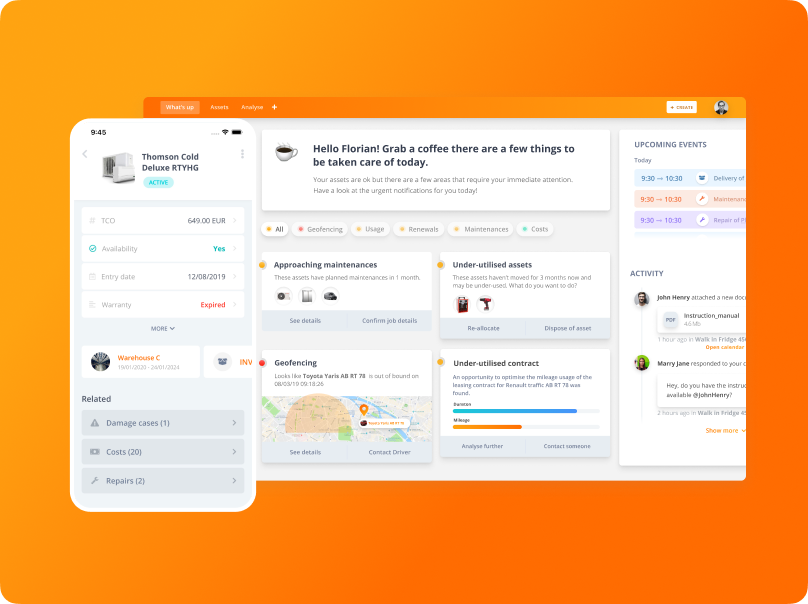
It’s an easy, AI-powered, all-in-one asset management platform that helps you:
- track assets across locations – logical tracking or physical tracking (i.e. gps position on maps and indoor position on floor plans)
- assign assets to people or teams – simple assignments or bookings
- keep clean records and documentation
- automate maintenance workflows and keep service history
- stay audit-ready
- manage asset financials – costs import, TCO analytics or invoicing automation
In short: it gives operations teams a clear picture of what you own, where it is, who’s responsible for it, and what shape it’s in without the heavy setup that many enterprise tools require.
What to ask before you choose any system
If you want to avoid buying the wrong type of software, ask these internally:
Are we losing assets, or losing uptime?
Do we need work orders, or visibility and audits?
Who needs to use this daily, maintenance or operations?
Do assets move between sites and teams often?
Do we need check-in/check-out of shared equipment?
Do we need to track costs or automate invoicing of assets or maintenance services?
Do we need lifecycle tracking (purchase → retire)?
The bottom line
These categories overlap, but they’re not the same:
- Asset tracking is visibility-first
- CMMS is maintenance-first
- Asset management (EAM) covers the entire life of assets (and always include maintenance)
If you’re a growing business that needs both tracking and maintenance visibility – without enterprise complexity – an all-in-one platform like Bulbthings can be the simplest path forward.