7 Best Asset Panda alternatives for mid-size businesses in 2026

Asset Panda has built a strong reputation in the asset management space, offering a highly configurable platform that helps organizations track everything from IT hardware and construction equipment to software licenses and office furniture. Its no-code customization engine, full-featured mobile app, and flexible pricing have earned it a loyal following across industries like education, healthcare, and government.
But as your business grows and your asset management needs evolve, you may find that Asset Panda’s extensive configuration options require more time and effort than your team can afford. You might also discover that certain operational needs, such as digitalizing multi-step asset workflows, collaborating with field technicians and suppliers in real-time, or leveraging AI to reduce manual busywork, fall outside what Asset Panda was designed to do well.
That’s where this guide comes in. We’ve researched and tested dedicated Asset Panda alternatives that excel where specific teams need them most, whether you’re looking to:
- Digitalize asset-centric workflows with built-in team collaboration, AI, and advanced stock or fleet management
- Get affordable, integration-rich asset tracking for a small team on a tight budget
- Deploy enterprise-grade predictive maintenance powered by IoT and machine learning
- Run a full CMMS with AI-powered work order management for your maintenance team
- Track inventory visually with minimal setup and zero overhead
- Self-host a free, open-source asset management system with your own IT resources
- Automate IT device lifecycle management with built-in security scanning
This isn’t about finding a “better” platform than Asset Panda. It’s about finding the right fit for your specific needs, team size, and growth trajectory. Some of these tools may even complement Asset Panda as part of a larger tech stack.
Let’s explore the alternatives.
| Best Asset Panda Alternatives 2026 | ||
|---|---|---|
 | Starts at: Free 🎁 G2 Score: N/A Capterra Score: 5.0 | Bulbthings Best Alternative for Digitalizing Asset-Centric Workflows with Collaboration and AI We chose Bulbthings because it digitalizes asset-centric workflows across equipment, vehicles, consumables, and facilities in one collaborative platform, with a full AI agent, advanced stock management, and granular permissions designed for mid-sized businesses managing thousands of assets. |
 | Starts at: $40/mo G2 Score: 4.4 Capterra Score: 4.6 | EZOfficeInventory Best Alternative for Affordable, Integration-Rich Asset Tracking for Small Teams EZOfficeInventory offers transparent asset-based pricing starting at $40/month with unlimited users, native Zendesk and Jira integrations, and RFID support, making it the most accessible option for small businesses on a budget. |
 | Starts at: ~$40,000/yr G2 Score: 4.4 Capterra Score: 4.2 | IBM Maximo Best Alternative for Enterprise-Grade Asset Lifecycle Management with Predictive Maintenance IBM Maximo is the platform that Fortune 100 companies and critical infrastructure operators rely on for AI-powered predictive maintenance, industrial IoT ingestion, and regulatory compliance at massive scale. |
 | Starts at: $20/user/mo G2 Score: 4.5 Capterra Score: 4.6 | UpKeep Best Alternative for Mobile-First Maintenance and CMMS UpKeep goes beyond asset tracking into full maintenance operations with AI-powered work order triage, built-in IoT sensor monitoring, and a mobile app designed specifically for maintenance technicians in the field. |
 | Starts at: Free 🎁 G2 Score: 4.4 Capterra Score: 4.5 | Sortly Best Alternative for Visual, Drag-and-Drop Simplicity Sortly replaces database depth with a photo-first, folder-based interface that lets teams track inventory visually with minimal setup, a generous free plan, and an extremely short learning curve. |
 | Starts at: Free 🎁 G2 Score: 4.6 Capterra Score: 4.4 | Snipe-IT Best Alternative for Free, Open-Source IT Asset Management Snipe-IT is a completely free, open-source ITAM system with no limits on users or assets, a dedicated software license management module, and full API access for teams with technical resources. |
 | Starts at: Free 🎁 G2 Score: 4.3 Capterra Score: 4.8 | Reftab Best Alternative for IT Asset Security and Device Lifecycle Automation Reftab automates the IT device lifecycle with native MDM and identity provider integrations, CVE vulnerability scanning, and SCIM-based onboarding/offboarding workflows. |
What is Asset Panda?
Asset Panda is a cloud-based asset tracking and management platform that provides great configurability.
Founded in 2012 by Rex Kurzius, the platform is designed to let organizations track and manage the entire lifecycle of their physical and digital assets, from acquisition to disposal, without requiring technical expertise. It serves over 4,000 organizations across more than 140 industries and 60 countries.
Its key features include:
- No-code customization engine for creating custom fields, workflows, forms, and reports tailored to any business process
- Full-featured mobile apps for iOS and Android with built-in barcode and QR code scanning that eliminates the need for dedicated hardware
- Asset lifecycle management covering tracking, check-in/checkout, depreciation, maintenance scheduling, and auditing

Source: Asset Panda
- Per-user pricing model where standard plans are seat-based (with an unlimited-user option on the Enterprise tier)
- Comprehensive audit trail that logs every action taken on every asset, including who, what, when, and where
- AI copilot (Ursa) for automating data imports, natural language search, and AI-guided database setup in the Pro version
Asset Panda’s strength lies in its ability to be molded to fit many asset tracking workflows. When you configure a custom field, set up an automated notification, or create a tailored check-in/checkout process, it all flows into one centralized, searchable database with a complete history attached. For organizations that need a flexible, customizable tracking tool, Asset Panda delivers.
However, that flexibility comes with trade-offs.
The extensive customization options can create a steep learning curve, and the initial setup process can be involved and time-consuming. The platform’s per-user pricing (starting at $50/user/month with a 5-user minimum) can add up quickly, and some capabilities, such as real-time GPS tracking and IoT-based condition monitoring, are either limited or require additional configuration.
For teams with specific operational needs beyond tracking, a more purpose-built solution may be the better fit.
How We Curated Our List of Asset Panda Alternatives
After testing Asset Panda and researching the broader asset management market, we found that organizations looking for alternatives often have needs that extend beyond what a general-purpose tracking tool handles most efficiently.
While Asset Panda excels at configurable asset tracking, businesses often need more power for:
- Digitalizing multi-step asset workflows with structured collaboration across internal teams, suppliers, and customers
- Replacing extensive configuration with a modern, intuitive experience that requires minimal training
- Running full maintenance operations with intelligent work order routing and IoT-based condition monitoring
- Tracking assets visually with minimal overhead for small teams
- Self-hosting an asset management system at zero cost with full API access
- Automating IT device lifecycle management with security intelligence built in
- Deploying enterprise-grade predictive maintenance at industrial scale
Each tool on this list is a leader in one of these areas.
| ❗DISCLAIMER: We aren’t covering every single tool. Our focus is on highlighting the best alternatives that address specific gaps in Asset Panda’s capabilities for various use cases and team sizes. |
|---|
1. Bulbthings — Best Alternative for Digitalizing Asset-Centric Workflows with Collaboration and AI
Bulbthings is a modern, AI-powered cloud-based platform built to digitalize asset-centric workflows and activities for mid-sized companies that have outgrown spreadsheets and basic tracking tools but don’t need the overhead of enterprise software.
Designed for organizations managing thousands of assets across multiple classes, locations, and teams, Bulbthings brings structured collaboration, workflow automation, and an AI copilot agent together in a single platform.
Its key features include:
- Multi-class asset management: Track serialized equipment, vehicles, tools, machinery, consumables, and facilities within a single platform, with asset profiles customizable per category and multiple inventory views including registers, stock levels, floor maps (indoor), GPS maps (outdoor), and planning views
- Team collaboration across internal and external stakeholders: Workspace management with asset-level conversations, @mentions, photo sharing, and structured collaborative workflows across internal teams, suppliers, and customers, with enterprise-grade granular roles and permissions
- Fresh, intuitive design: A “simple by design” interface with consistent profile layouts, straightforward tab navigation, and smart visual planning tools that reduce training requirements. Bulbthings was built for instant onboarding and no training required to get started.
- Bulb AI agent: A full AI copilot for natural language interaction across all platform actions, including asset creation via photo recognition, bookings, maintenance logging, report generation, and workflow execution.
- Advanced stock management: Stock intake, allocation to locations and people, stock value calculation, min/max stock level alerts, and stock level trends and reporting
- Vehicles and Plant Fleet Management: Mileage tracking, fuel consumption, driver incident reporting, fines and damages management, TCO calculation, and corporate fleet leasing contract management
- Built-in maintenance management (CMMS): Schedule preventive and corrective maintenance, create work orders, track costs in real time, and manage technician assignments
- Service Providers and Rental/Leasing Management: Front-office operations (CRM, e-shop, quotation and invoicing), logistics (supplier records, orders, delivery management), and back-office (financial reporting and stock management)
- Low-code workflow automation: Adapt standard workflows or build new ones to match your team’s processes, with off-the-shelf workflows by industry included out of the box.
- Mobile app: QR code and NFC scanning, photo capture, Bulb AI interaction, and asset management on the go, with limited offline capabilities
- Optional telematics and IoT connectivity: As an add-on, connect GPS tracking devices and IoT sensors for real-time asset monitoring
For mid-size to large businesses that manage a diverse mix of physical assets across multiple locations and need their teams, technicians, suppliers, and even customers to collaborate on a single platform, Bulbthings provides the depth to digitalize workflows that a tracking-focused tool cannot accommodate.
Why Choose Bulbthings Over Asset Panda
While Asset Panda is a capable tracking tool, Bulbthings provides a broader operational platform designed to digitalize the workflows and activities that surround your assets. Here’s where Bulbthings steps up.
Multi-Class Asset Management: Equipment, Vehicles, Consumables, and Facilities in One Place
Asset Panda is designed primarily as an asset tracking database.
You can configure it to track different types of items, and it does offer fleet and inventory management solutions, but managing vehicles alongside IT equipment alongside consumable inventory may still require considerable custom setup to unify under one cohesive workflow.
Bulbthings was built from the ground up to handle this diversity natively.
Equipment, machinery, vehicles, tools, IT hardware, buildings, and even bulk consumables are managed within the same platform, with asset profiles, and all other forms, fully customizable.
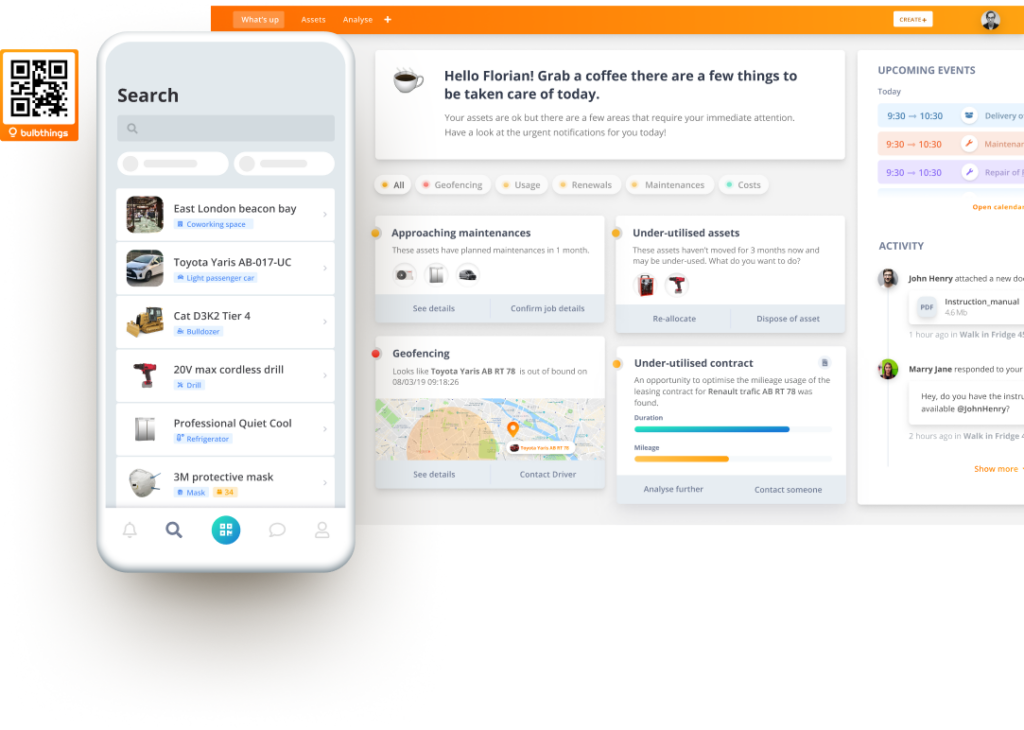
Each asset type gets the data fields, workflows, and tracking methods appropriate to it. Consumables are tracked by quantity with stock-level monitoring and alerts. Serialized equipment gets full lifecycle management with QR code and NFC scanning. Vehicles get mileage and fuel tracking tracking, fines, damages, leasing contracts workflows with TCO optimization. Buildings get their own data and workflows too. More importantly, entire new categories of assets can be added easily with their own data and workflows. Each asset profile maintains a complete history including allocations, bookings, maintenance activities, service or financial contracts, and conversations.
Source: Bulbthings
The platform also provides multiple ways to view your inventory: registers for structured data, stock levels for consumables, floor maps for indoor location tracking, GPS maps for outdoor assets, and planning views for scheduling and resource allocation.
⚡ Bulbthings in Action: A facilities management company tracks its fleet of service vehicles, manages its stock of replacement parts and consumables with inventory alerts, and keeps tabs on all customer-site equipment with QR code scanning, all from one platform.
When a technician arrives at a site, they scan the equipment’s QR code, view its maintenance history, log a repair, and the parts used are automatically deducted from inventory. No switching between apps. No manual reconciliation.
Modern, Intuitive Interface: Productive in Minutes, Not Weeks
One of the most common criticisms of Asset Panda is its steep learning curve.
The platform’s power comes from its extensive configuration options, but that same depth can make the initial setup process involved and the day-to-day interface feel dense, with many menus, buttons, and nested options that require training to navigate efficiently.
Bulbthings prioritizes a modern, clean interface that is “simple by design.”
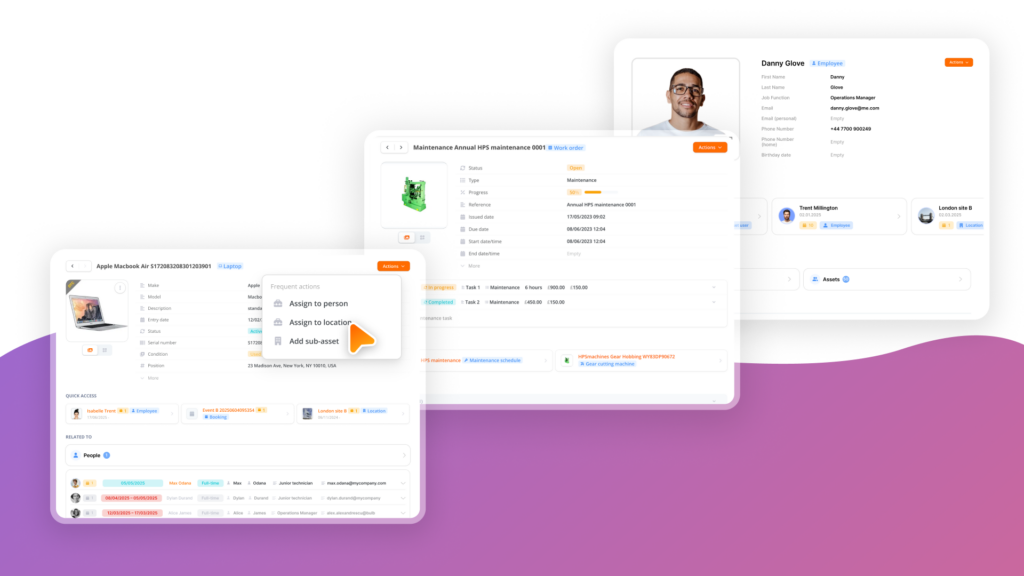
The platform uses a consistent layout across all records/profiles with on-click “Actions” button to run your workflows, a straightforward tab system for organizing views, and smart visual planning tools (including visual stock breakdown by asset category and location, color-coded activity calendars, GPS maps for outdoor assets and floor maps for indoor tracking), and that make information immediately accessible.

Source: Bulbthings
One customer, Studiomatic, noted that Bulbthings “stood out as the only SaaS that combined modernity and the correct amount of comprehensiveness.”
⚡ Bulbthings in Action: A new employee joins your operations team. Within their first hour, they download the Bulbthings mobile app, scan a few QR codes on nearby equipment, and immediately see each item’s profile, status, and booking availability. They book a piece of shared equipment for the afternoon by scanning its code.
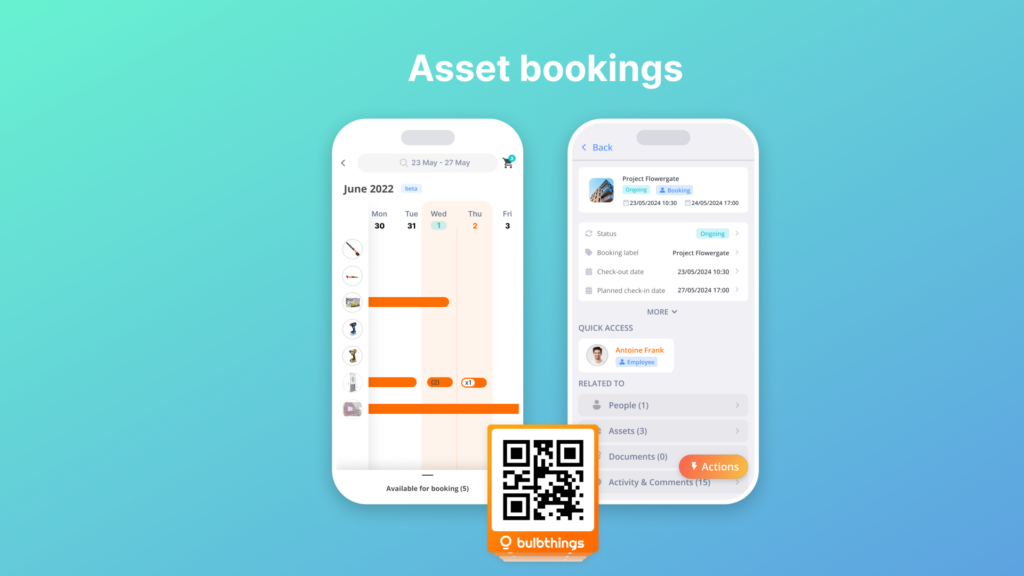
The intuitive interface means minimal ramp-up time, even for team members who have never used an asset management platform before.
Team Collaboration: Connect Office, Field, Supplier, and Customer Teams in Real Time
Asset Panda provides individual user access, role-based permissions, and a comments feed for discussing assets.
However, its collaboration features are relatively basic compared to a purpose-built collaboration workflow, particularly when it comes to working with external stakeholders.
Bulbthings treats collaboration as its core differentiator, including what its community likes to call a “WhatsApp for assets” accessible both from the web and mobile apps. Unlike Whatsapp, these team discussions do not disappear overtime, they are organised and structured. They are kept in the history of every relevant record, rather it’s an asset, a booking, a word order, contract or anything else and a dedicated discussions page allows to search on specific topics or messages, across all team discussions.
Team members can start conversations within the context of any asset, using @mentions to notify specific people and attaching photos to provide visual context.
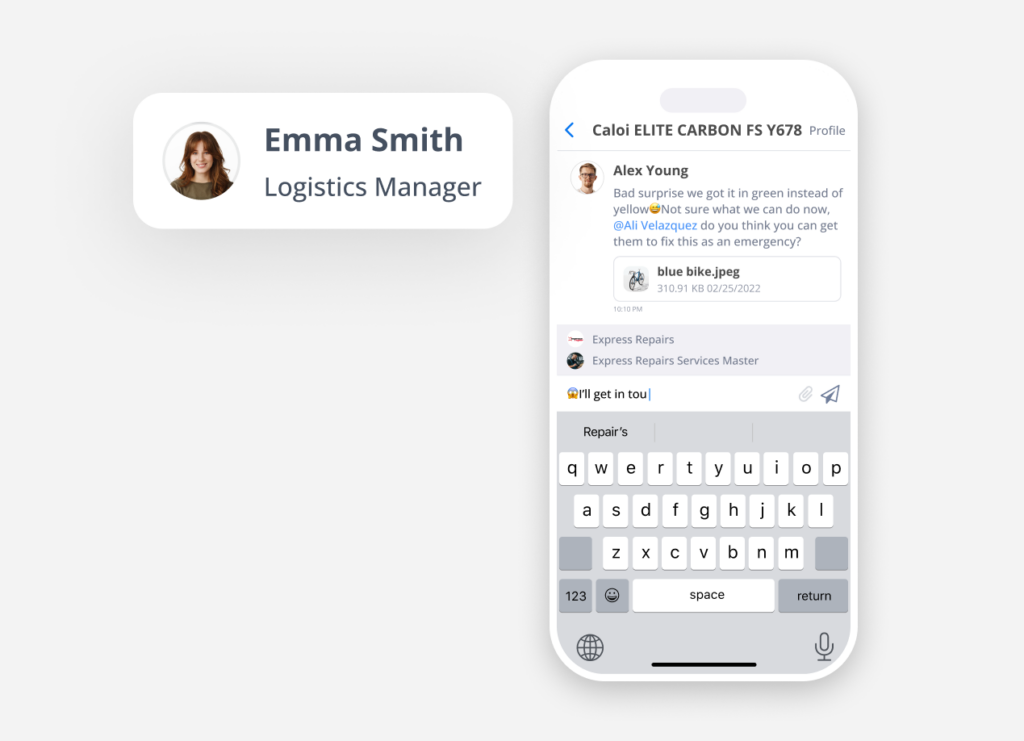
Anyone involved with your assets, rather it’s managers, staff, technicians, external suppliers, and even customers, can participate in collaborative workflows, each with appropriate access levels controlled through granular, fine-tuned roles and permissions that can be configured based on virtually any criteria.
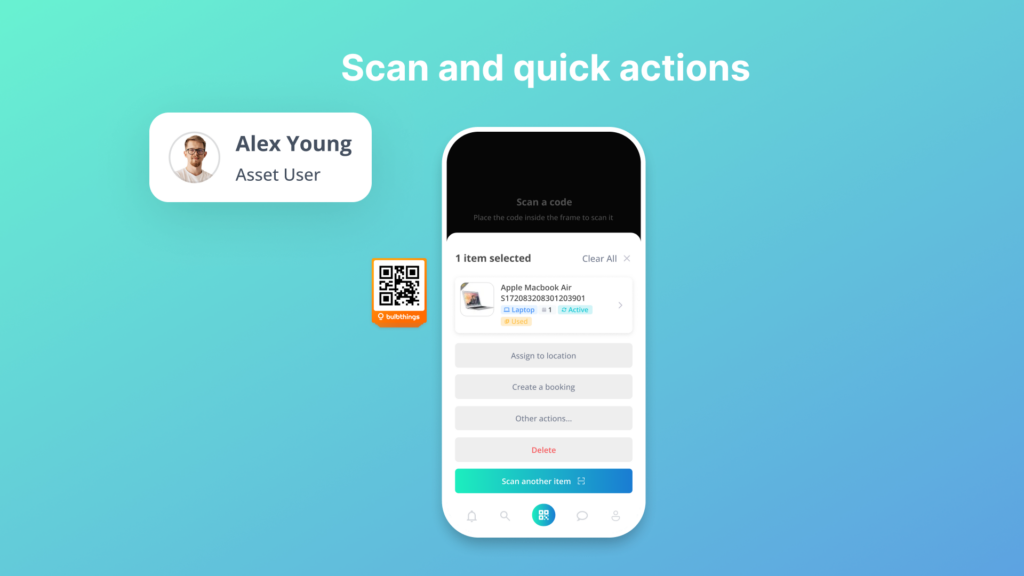
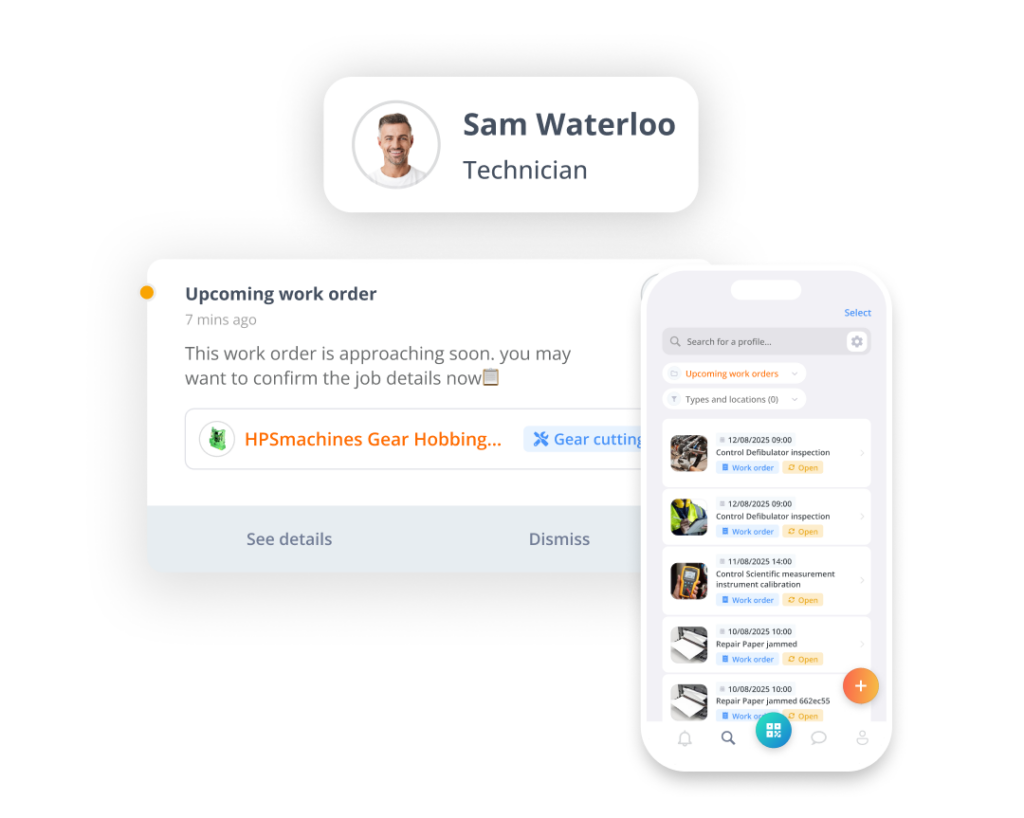
The platform supports workspace management for different teams (e.g. one workspace for IT and another for Operations) and enables cross-country collaboration with multi-language, multi-currency, and multi-metrics support.
Organizations can also share public asset information via link or QR code, office users can scan a public QR code to log issues without downloading the app, and work order information can be shared with suppliers via email links.

⚡ Bulbthings in Action: A technician at a remote site scans a piece of equipment’s QR code and discovers damage. They snap a photo, @mention their supervisor directly on the asset’s record, and describe the issue. The supervisor sees the notification, reviews the photo and the equipment’s maintenance history, and immediately creates a work order with parts needed.
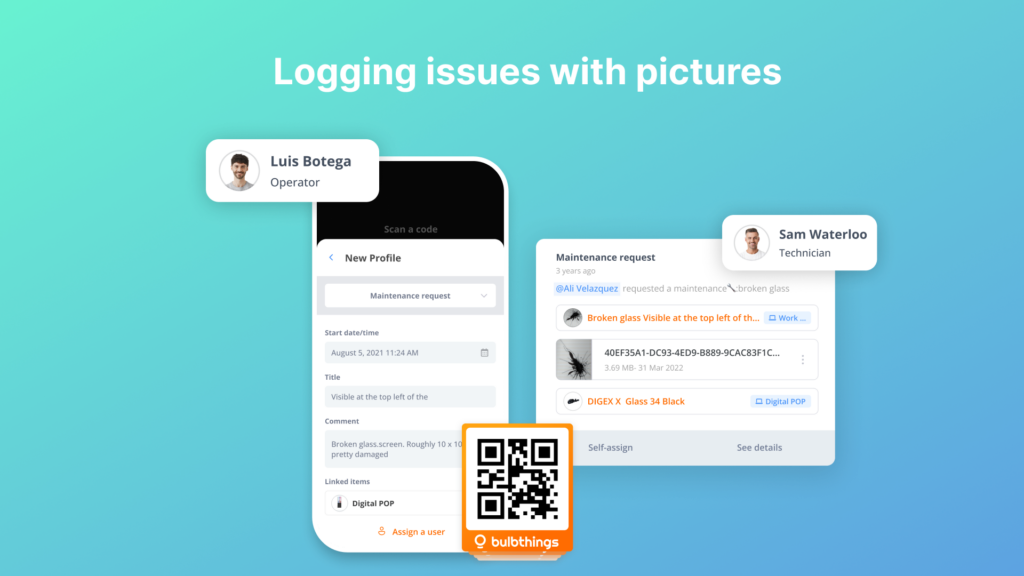
The work order details are shared with an external supplier via an email link, who confirms parts availability directly. The entire exchange is documented alongside the asset’s records, visible to anyone with the right permissions.
Bulb AI Agent: Manage Assets Through Conversation, Not Configuration
Asset Panda recently introduced its Ursa AI assistant, which helps with data import mapping, natural language search, and guided setup.
These are useful for getting started, but the AI functionality is primarily available on higher-tier plans and focuses largely on reducing setup friction rather than handling day-to-day operational tasks.
Bulbthings takes a different approach. Its full AI copilot agent, Bulb AI, is designed to handle day-to-day asset management tasks across the entire platform through natural language conversation.
Users can add new assets by simply taking a photo via the mobile app, as Bulb AI identifies the item and populates its details using image recognition. They can make equipment bookings, log maintenance requests, create maintenance schedules, generate reports, and trigger workflows by asking Bulb AI in plain language. The agent works at both the individual asset (or any other record) level and across the entire workspace.

Source: Bulbthings
Bulb AI provides three key advantages: instant onboarding (no need to remember where to click or navigate), productivity gains (faster execution, especially for bulk actions on large asset volumes), and actionable insights from your data. A Developer AI Agent is also in development that will allow customers to customize workflows using natural language.
⚡ Bulbthings in Action: A warehouse manager needs a quick overview of all equipment due for maintenance next week. Instead of navigating through menus and building a filtered report, they ask Bulb AI: “Show me all equipment with maintenance due in the next 7 days.” The report generates instantly.
Later, a field worker takes a photo of a new piece of equipment. Bulb AI recognizes it, creates the asset profile, and asks a few follow-up questions to complete the record. No forms. No menus. Just a conversation.
Advanced Stock Management: Beyond Basic Inventory Tracking
Asset Panda handles consumable items through its Kits + Consumables feature, using a flexible, configuration-driven approach.
However, dedicated stock management capabilities, such as stock value calculation, allocation workflows, and trend analysis, require additional setup.
Bulbthings includes purpose-built stock management that goes beyond basic inventory counts.
The platform supports stock intake, stock allocation to specific locations and people (for example, PPE distribution or materials tracking), stock value calculation, alerts on minimum and maximum stock levels, and stock level trends and reporting.
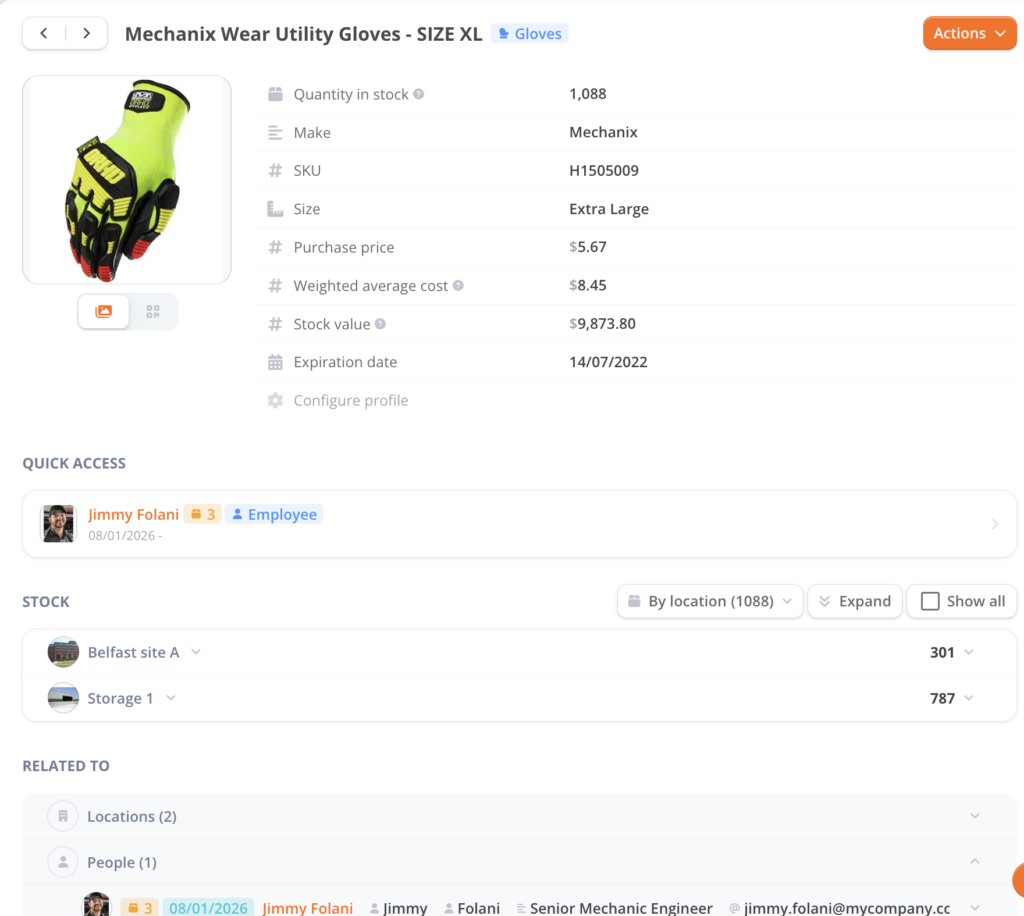
This means you can see not just what you have, but where your inventory is allocated, what it’s worth, and how consumption patterns are trending over time, all without configuring custom fields or building workarounds.
⚡ Bulbthings in Action: A construction company manages PPE and materials across five sites. Bulbthings tracks hard hats, safety vests, and harnesses by location, automatically alerting site managers when stock falls below the minimum threshold. The operations director views a stock trends report to identify which sites consume PPE fastest and adjusts procurement accordingly, all from a single dashboard.
Vehicles and Plant Fleet Management: Purpose-Built, Not Configured
Asset Panda offers fleet management as part of its broader tracking capabilities, but it lacks specific fleet features such as mileage tracking, fuel consumption reporting, and fines and damages management.
Managing a fleet in Asset Panda means configuring custom fields and workflows to approximate these capabilities.
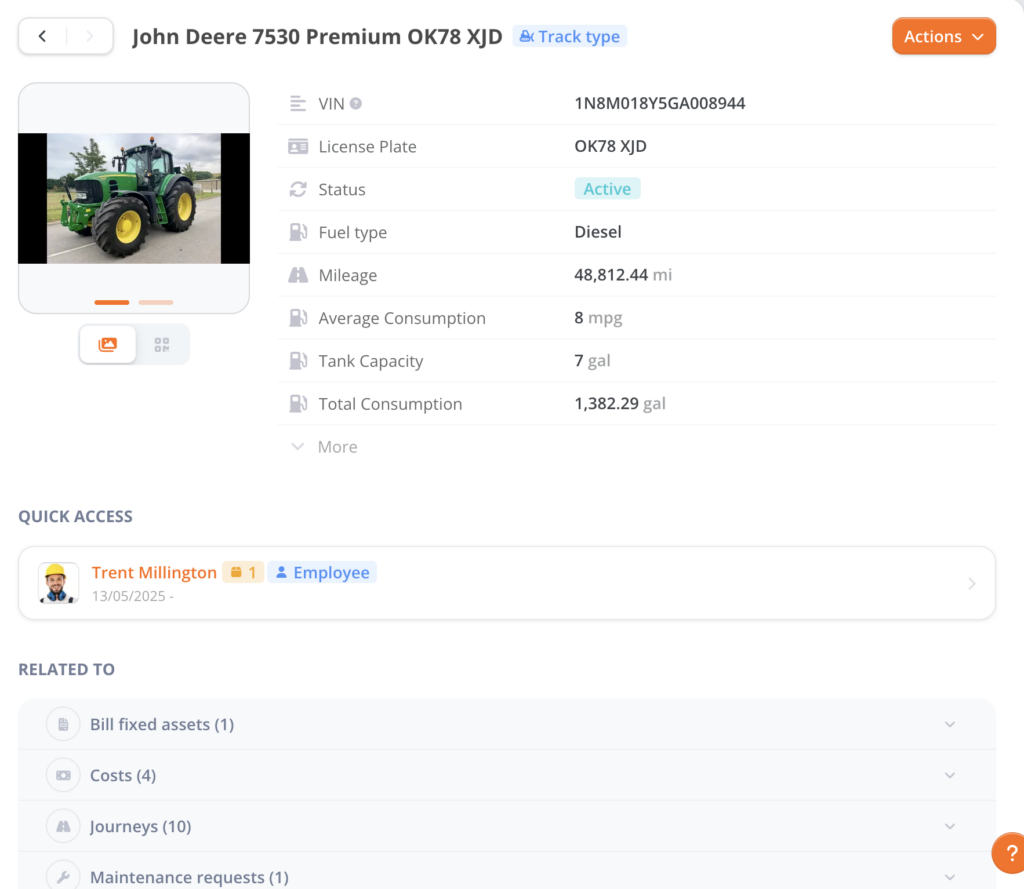
Bulbthings includes dedicated Vehicles and Plant Fleet Management with features built specifically for fleet operations: mileage tracking, fuel consumption tracking, driver incident reporting, fines and damages management, and end-of-life management.
For corporate fleets, the platform also supports leasing contract quotation and comparison, ordering from suppliers, fleet cost import (maintenance, fuel, financing or depreciation), and Total Cost of Ownership calculation. Optionally, organizations can connect GPS tracking devices and IoT sensors as an add-on for real-time vehicle location monitoring, idling alerts, and geo-fencing.
⚡ Bulbthings in Action: A logistics company with 200 vehicles uses Bulbthings to track mileage and fuel consumption across its entire fleet. When a driver reports an incident, it’s logged against the specific vehicle with photos and notes. The fleet manager compares leasing contract options for upcoming renewals and reviews TCO reports to decide which vehicles to replace. GPS tracking (via an optional IoT add-on) provides real-time location data and geo-fencing alerts for route compliance.

Service Providers and Rental/Leasing Management
Asset Panda provides basic depreciation and inflation calculation for financial tracking but does not offer dedicated rental, leasing, or service provider management workflows.
Bulbthings includes comprehensive Service Providers and Rental/Leasing Management covering three operational areas.
Front-office: customer records, CRM integration, e-shop plug-in, quotation and invoicing. Logistics: supplier records, orders, delivery management, and end-of-rental checks. Back-office operations: stock management, maintenance management, and financial reporting. This makes Bulbthings a fit for businesses that rent or lease equipment to customers, not just those tracking assets internally.
⚡ Bulbthings in Action: An equipment rental company manages its entire operation in Bulbthings. Customers request equipment through the e-shop. The team generates a quotation, schedules delivery, and tracks the rental period.
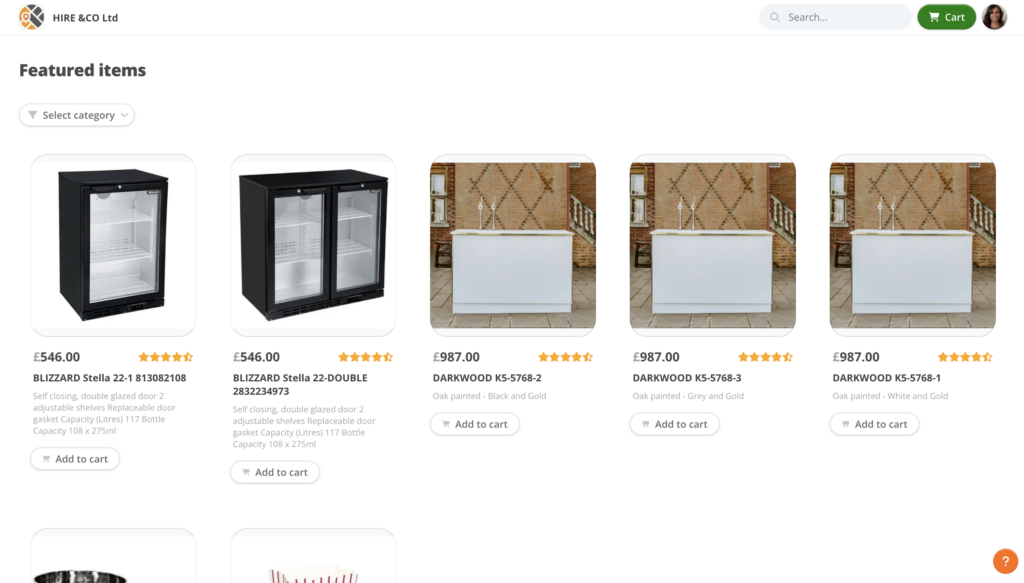
When equipment returns, an end-of-rental check is logged. Invoicing is handled directly in the platform, and the financial reporting dashboard shows rental revenue, maintenance costs, and equipment utilization rates.
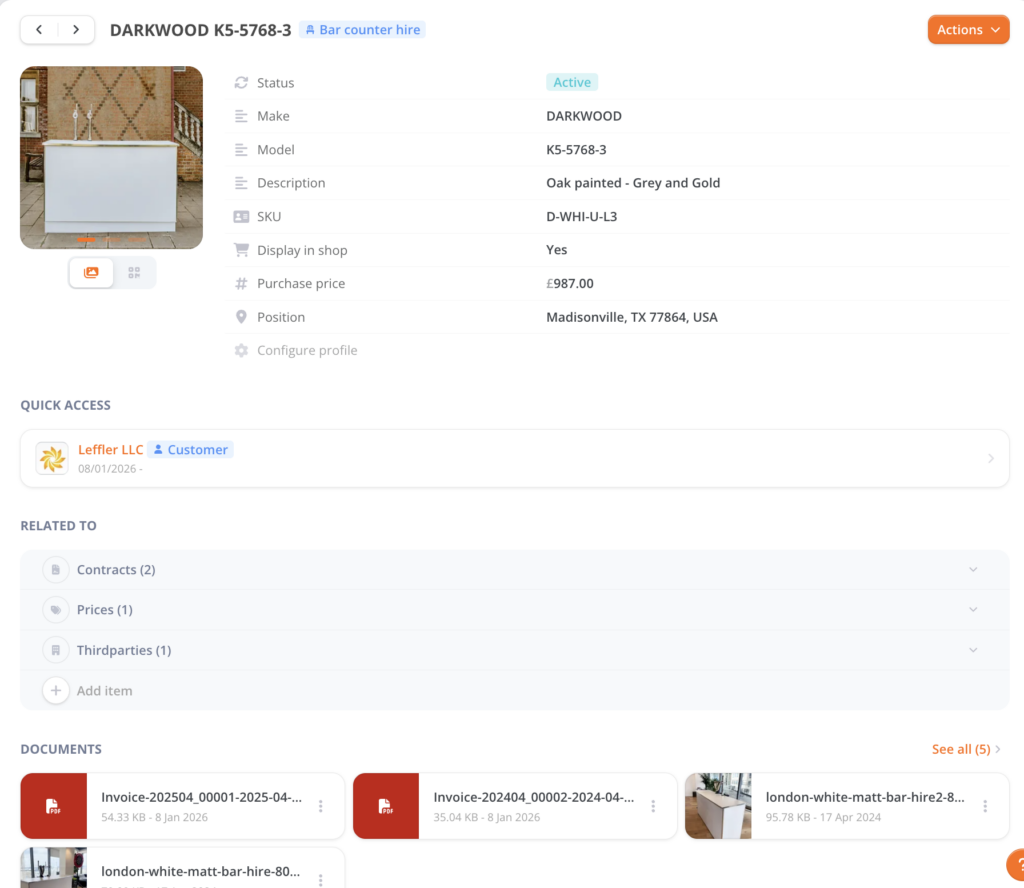
Financial Management: Costs, Contracts, and Customer Invoicing
Beyond basic depreciation, Bulbthings offers advanced financial management capabilities.
Organizations can track asset costs, manage service and financial contracts attached to asset profiles, and handle customer invoicing for asset hire or maintenance services. This gives finance and operations teams visibility into the cost of their asset portfolio, not just its depreciated book value.
Low-Code Workflow Automation: Digitalize Your Processes, Not Just Your Spreadsheets
Asset Panda’s customization engine allows creating fields, forms, and workflows, but the platform was not built on a low-code architecture.
When organizations need to digitalize particular multi-step workflows with specific validation rules and approval processes, the configuration can become involved and costly.
Bulbthings was built as a low-code platform from the ground up, heading toward no-code capabilities.
The platform comes with off-the-shelf workflows by industry, so customers get pre-built solutions in addition to customization capability.
When needed, Bulbthings enables customization of workflows, validation processes, checklists, and forms without requiring extensive development resources.

An AI workflow builder agent is in development that will allow customers to build and modify workflows on their own. Combined with Bulbthings API and SDK, teams can automate multi-step processes that older platforms either cannot accommodate or charge significantly more to implement.
Bulbthings Pricing
Bulbthings uses a usage-based pricing model determined by your industry, the number of assets you manage, and the feature “Packs” you select.
A key differentiator is that pricing is not based on users: you can add an unlimited number of team members, suppliers, and external partners at no extra cost, which makes it practical to extend collaboration beyond your internal team to the suppliers, customers, and subcontractors who interact with your assets daily.
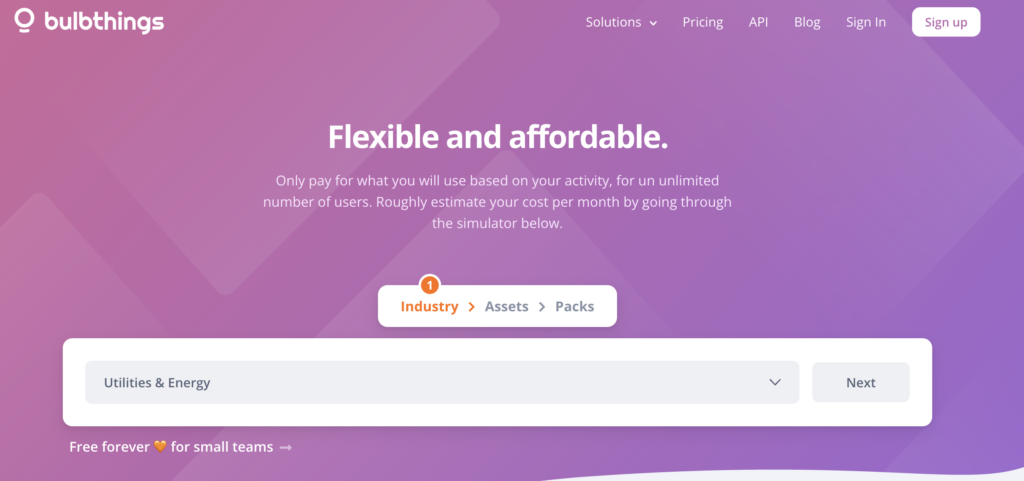
The company offers a pricing simulator on their website to generate a custom estimate. Discounts are available for longer commitments: 15% off for annual payments and 10% off for semi-annual payments. Self-onboarding with online payment is available for teams that want to get started quickly.
Additional services include QR code supply (starting from €250 per 1,000 units, though using your own existing codes is also supported) and custom quotes for advanced workflow customization (€550/day), third-party integrations, and optional IoT/telematics connectivity.
Compared to enterprise asset management platforms, Bulbthings offers much shorter implementation timelines and a more reasonable budget. A feature-packed free plan is available forever for small teams 🧡 up to 100 assets and 10 account users.
Who Should Use Bulbthings?
Choose Bulbthings if:
- You need your office team, field technicians, suppliers, and customers collaborating in real time on asset records, with structured conversations, @mentions, photo sharing, effective workflows and granular permissions that control exactly who sees and does what.
- You manage a diverse portfolio of physical assets beyond just IT equipment, including vehicles, machinery, tools, facilities, and consumables, and you need all of them tracked, maintained, and managed in one platform instead of juggling multiple tools.
- You’re looking for a modern, AI-powered platform that simplifies asset management through natural language and automation, where Bulb AI reduces the busywork of forms, menus, and configurations that dominate older platforms.
- You need advanced stock management, rental/leasing operations, or financial management capabilities that go beyond what a tracking-focused tool provides.
- You have multi-step asset workflows that need to be digitalized, and you need a low-code platform with off-the-shelf industry workflows that can be customized to your processes.
Ready to see how Bulbthings can digitalize your asset management workflows? Start your free trial and experience collaborative, AI-powered asset management designed for growing businesses.
2. EZOfficeInventory — Best Alternative for Affordable, Integration-Rich Asset Tracking for Small Teams
EZOfficeInventory is a cloud-based asset tracking platform that gives small businesses a centralized system to monitor equipment lifecycles without the pricing complexity of Asset Panda.

Part of the broader EZO “Asset Intelligence” suite, EZOfficeInventory remains a focused, accessible tool for physical asset tracking, maintenance scheduling, and inventory control.
Its key features include:
- Native help desk integrations with Zendesk, Jira Service Management, and other ITSM platforms
- RFID, barcode, and QR code scanning with a built-in label designer for creating custom tags
- Preventive maintenance with recurring service tickets, technician assignment, and automated alerts
- Asset-based pricing with unlimited users starting at $40/month for up to 250 items
- Custody and location tracking with check-in/check-out workflows and full audit trails
Why Choose EZOfficeInventory Over Asset Panda
EZOfficeInventory stands out in several ways that matter specifically to small businesses:
Significantly Lower Entry Cost with Transparent Pricing
EZOfficeInventory publishes its pricing openly: the Essentials plan starts at $40/month for up to 250 items, the Advanced plan at $55/month, and the Premium plan at $65/month, all with unlimited users. Asset Panda starts at $50/user/month with a 5-user minimum ($250/month floor), and the Business+ plan requires 10 users at $60/user/month ($600/month floor).
For a small business with 10 users tracking a few hundred assets, EZOfficeInventory can cost a fraction of what Asset Panda charges.
Native Help Desk Integrations Small IT Teams Actually Need
EZOfficeInventory offers out-of-the-box integrations with Zendesk and Jira Service Management that allow support agents to see linked asset information directly within the help desk interface.

Source: EZOfficeInventory
Asset Panda also integrates with Zendesk and Jira, but its pricing page indicates integrations are included starting from the Business+ plan ($60/user/month minimum). On EZOfficeInventory, these integrations are available on the Premium plan at $65/month total, not per user.
RFID Support Without Enterprise Commitments.
EZOfficeInventory includes RFID tracking starting from its Advanced plan ($55/month for 250 items). RFID allows teams to scan large numbers of assets simultaneously from a distance, without needing line of sight.
This is a significant efficiency gain when conducting audits in warehouses, stockrooms, or large facilities. Asset Panda’s scanning capabilities center on barcode and QR code scanning through its mobile app camera, which is line-of-sight based (though it does offer a Group Scan feature for scanning multiple barcodes in quicker succession).
🏅 NOTE: We also evaluated Sortly and GoCodes for the small business archetype. While Sortly excels at visual simplicity for basic inventory and GoCodes offers a straightforward tag-and-track approach, EZOfficeInventory provides the best balance of affordability, help desk integrations, RFID support, and built-in maintenance scheduling for small businesses.
EZOfficeInventory Pricing
EZOfficeInventory uses tiered pricing based on item count, with all plans supporting unlimited users:
- Essentials: $40/month for up to 250 items. Asset tracking, check-in/check-out, reservations, depreciation, mobile app, and email support.
- Advanced: $55/month for up to 250 items. Adds RFID and handheld scanner support, purchase orders, custom fields, custom reports, and API access.
- Premium: $65/month for up to 250 items. Adds Zendesk/Jira integrations, workflow automations, advanced permissions, GPS visibility, and a dedicated account manager. CMMS is available as a separately priced add-on.
- Enterprise: Custom pricing. Adds offline mobile mode, telematics integration, private cloud, and custom integrations.

Who Should Use EZOfficeInventory?
Choose EZOfficeInventory if:
- Your team is small but everyone needs access. The unlimited users model on every plan means your entire team can interact with asset records without per-seat costs adding up.
- You already use Zendesk or Jira and want asset management tightly linked to your support workflow. The native integrations allow bidirectional data flow so you can resolve tickets faster with full equipment context.
- You need RFID capability at an accessible price point. If your environment involves large quantities of physical assets that need to be audited quickly, EZOfficeInventory’s RFID support on the Advanced plan provides mass-scanning efficiency without enterprise-level pricing.
3. IBM Maximo — Best Alternative for Enterprise-Grade Asset Lifecycle Management with Predictive Maintenance
IBM Maximo (the IBM Maximo Application Suite, or MAS) is a comprehensive Enterprise Asset Management (EAM) and Asset Performance Management (APM) platform designed to optimize the lifecycle of physical assets, facilities, and infrastructure at massive scale.

It holds approximately 67% adoption among the Global Top 100 companies (according to Apps Run The World data) and has been a Gartner Magic Quadrant Leader in EAM for nearly three decades.
Its key capabilities include:
- AI-powered predictive maintenance (Maximo Predict) using machine learning to forecast equipment failures and calculate Remaining Useful Life
- Industrial IoT integration (Maximo Monitor) that ingests high-frequency sensor data from PLCs, SCADA systems, and IoT devices
- Asset health scoring and risk assessment (Maximo Health) with dynamic scores based on age, MTBF, costs, and real-time readings
- Computer vision inspection (Maximo Visual Inspection) for detecting defects from camera feeds, drones, and mobile devices
- Flexible deployment on AWS, Azure, Google Cloud, IBM Cloud, on-premises via Red Hat OpenShift, or hybrid configurations

Source: IBM Maximo
Why Choose IBM Maximo Over Asset Panda
IBM Maximo addresses an entirely different tier of the market than Asset Panda:
AI-Powered Predictive Maintenance Beyond Scheduling.
Asset Panda offers preventive maintenance scheduling with time-based or usage-based intervals. IBM Maximo transforms this paradigm through its Predict application, which uses machine learning to train survival analysis models and anomaly detection pipelines on your actual operational data.
The system calculates the statistical probability that a specific pump, compressor, or transformer will fail within a given timeframe and generates prescriptive work orders with failure contribution breakdowns.
Industrial-Scale IoT Data Ingestion.
Asset Panda captures GPS coordinates when a user scans a barcode, a manual, event-driven data model. IBM Maximo Monitor deploys gateways that connect directly to PLCs, SCADA systems, and IoT sensors, continuously ingesting high-frequency time-series data, applying anomaly detection, and automatically creating service requests when thresholds are breached.
For organizations operating critical infrastructure, this real-time operational intelligence is the difference between condition-based maintenance and catastrophic failure.
Enterprise Compliance and Multi-Cloud Deployment.
Asset Panda holds SOC 2 Type II certification. IBM Maximo’s infrastructure supports ISO/IEC 27001 and SOC 1/2/3 certifications, and a FedRAMP Moderate-authorized deployment is available through partners.
Its containerized architecture on Red Hat OpenShift means organizations can deploy on any cloud or entirely on-premises, meeting strict data sovereignty and regulatory requirements.
🏅 NOTE: We also evaluated ServiceNow and SAP EAM for this enterprise archetype. While ServiceNow excels at ITSM-to-asset management bridging and SAP EAM offers tight ERP integration, IBM Maximo provides the beat enterprise asset management platform globally, with purpose-built AI, IoT, and predictive maintenance capabilities for large-scale industrial and facilities operations.
IBM Maximo Pricing
IBM Maximo uses a credit-based licensing system called AppPoints:
- Essentials MAS SaaS: Starts under $40,000/year (150 AppPoints). Limited to 1 environment, up to 25 users, 100 work orders/hour.
- Standard MAS SaaS: Starts at 300 AppPoints (custom quote). Full suite including Manage, Health, Visual Inspection, Monitor, Predict, and Assist.
- Premium MAS SaaS: Custom pricing. Adds database support, flexible upgrade scheduling, enhanced disaster recovery, and deployment validation for regulated industries.

Who Should Use IBM Maximo?
Choose IBM Maximo if:
- You operate in a heavily regulated, asset-intensive industry (nuclear, oil and gas, utilities, aviation) where regulatory compliance and comprehensive audit trails are non-negotiable, and where unplanned downtime can cost hundreds of thousands of dollars per hour.
- You need AI-driven predictive maintenance powered by real-time IoT and SCADA data across thousands of critical, sensor-instrumented assets.
- You require deployment flexibility across on-premises, hybrid, or multi-cloud environments to meet data sovereignty and security governance requirements.
4. UpKeep — Best Alternative for Mobile-First Maintenance and CMMS
UpKeep is a cloud-based, mobile-first Computerized Maintenance Management System (CMMS) that extends well beyond basic asset tracking into full maintenance operations.

Founded in 2014 by Ryan Chan, a former process-development engineer who experienced firsthand the inefficiencies of paper-based maintenance workflows, UpKeep serves thousands of customers across manufacturing, property management, food and beverage, healthcare, and facilities management.
Its key capabilities include:
- AI-powered work order triage and assignment that automatically prioritizes and routes tasks based on urgency, due dates, and technician availability
- Built-in IoT sensor monitoring via UpKeep Edge that tracks vibration, temperature, and other conditions around the clock, automatically generating work orders when thresholds are breached
- Robust preventive maintenance scheduling with calendar-based, meter-based, and hybrid triggers, plus seasonal inactive period support
- Mobile-first technician experience with offline capability, push notifications, photo annotation, and GPS-based reminders
- Parts and inventory management tied directly to work orders with minimum quantity reorder thresholds and cost tracking

Source: Upkeep
Why Choose UpKeep Over Asset Panda
UpKeep stands out for teams whose primary pain point is maintaining and servicing assets, not just tracking ownership:
AI-Powered Work Order Intelligence.
Asset Panda offers configurable automations for work orders, but setting them up can be involved.
UpKeep’s Intelligence suite automatically triages incoming work orders by analyzing urgency, priority, and technician workload, then assigns them without a manager needing to intervene. It also supports voice-to-create work orders and an AI checklist builder that produces step-by-step task lists from brief descriptions.
Note that UpKeep’s AI is focused primarily on maintenance workflows. If you need a broader AI agent that handles asset management actions across the full platform via natural language (including bookings, reporting, and asset creation), Bulbthings’ Bulb AI operates as a full copilot across all platform functions.
Built-In IoT Sensor Integration.
Asset Panda does not offer native IoT sensor integration for real-time asset monitoring. UpKeep Edge provides wireless IoT sensors that monitor vibration, temperature, and humidity around the clock. When a reading crosses a threshold, the system automatically generates a work order, enabling condition-based maintenance rather than reactive or time-based approaches.
A Purpose-Built Preventive Maintenance Engine.
While Asset Panda supports time-based and usage-based recurring tasks, UpKeep’s PM system adds hybrid triggers (whichever condition is met first), fixed vs. floating schedules, and seasonal inactive periods. Analytics track the ratio of preventive to reactive maintenance and mean time between failures, enabling data-driven refinement of the entire PM program.
A Mobile App Designed for Technicians.
Both platforms offer mobile apps, but UpKeep’s was designed from day one for maintenance workers.
It features push notifications for new work orders, voice-to-create functionality, photo annotation for documenting issues, offline mode with automatic sync, and GPS-based reminders on iOS that prompt technicians to start or stop work order timers when they arrive at or leave a job site.

Source: Upkeep
🏅 NOTE: We also evaluated Limble CMMS and Fiix for the maintenance-focused archetype. While Limble offers user-friendly work order management and Fiix provides advanced manufacturing-focused features, UpKeep offers the most compelling combination of AI-powered insights, built-in IoT sensor support, and a mobile-first technician experience.
UpKeep Pricing
UpKeep uses per-user, per-month pricing:
- Essential: $20/user/month. Unlimited work orders, asset management, barcode scanning, AI Intelligence suite, and 24/7 support.
- Premium: $55/user/month. Adds preventive maintenance optimization, custom checklists, inventory management, meter readings, and 30-day analytics.
- Professional: Custom pricing. Adds multiple inventory lines, signature capture, mobile offline mode, and advanced analytics.
- Enterprise: Custom pricing. Adds workflow automation, downtime tracking, purchase order management, multi-site support, API access, and SSO.

Implementation add-ons range from $500 (training only) to $5,000+. IoT sensors are an additional cost.
Who Should Use UpKeep?
Choose UpKeep if:
- Your primary need is maintenance operations, not just asset tracking. You have outgrown basic asset registers and need a full CMMS with work order management, preventive maintenance, parts inventory, and maintenance analytics.
- Your technicians live on their phones, not at desks. You need a fast, intuitive mobile app with offline capability, push notifications, and voice-to-create functionality for floor-based or field-based teams.
- You want to move from reactive to condition-based maintenance using IoT sensors to monitor equipment health and automatically trigger work orders when conditions deteriorate.
5. Sortly — Best Alternative for Visual, Drag-and-Drop Simplicity
Sortly is a mobile-first inventory and asset tracking platform built for small and medium-sized businesses that want an intuitive, photo-driven way to manage physical items without extensive configuration.
Founded in 2012 by Dhanush Balachandran (with a background spanning Intel and DJI), Sortly’s visual simplicity has remained central to the product.
Its key features include:
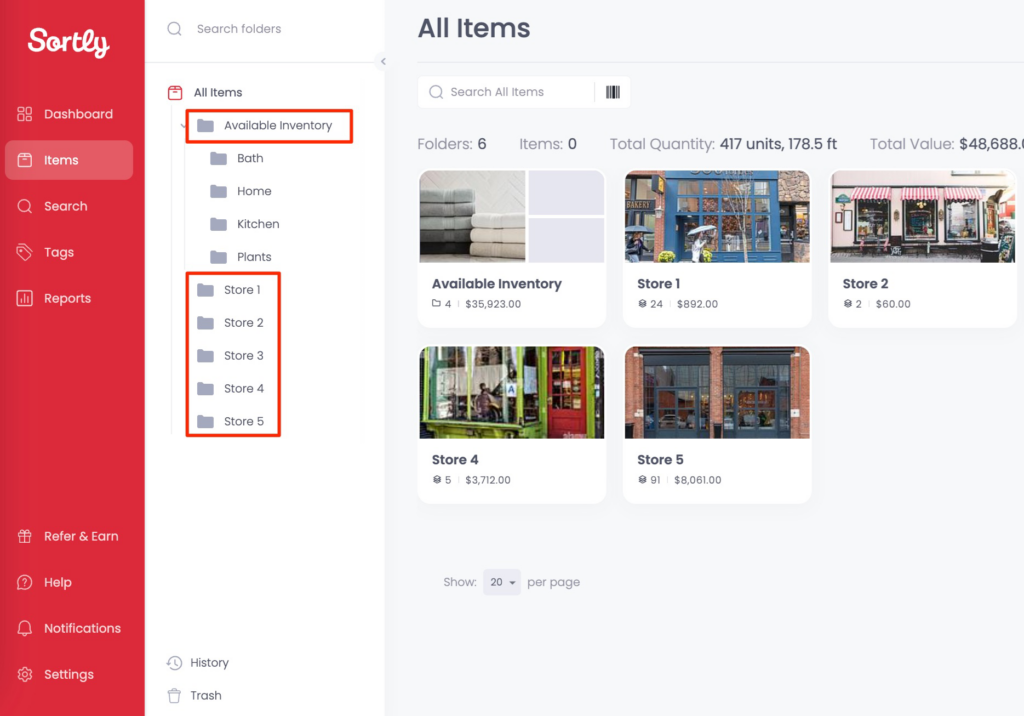
- Photo-first item tracking with up to eight high-resolution images per item
- Folder-based organization for organizing assets into locations and categories with a visual, gallery-style interface
- Built-in QR code and barcode generation and scanning directly from the mobile app (scanning available on Ultra plans and above)
- Low stock alerts and date-based reminders via email, in-app push, Slack, and Microsoft Teams
- A usable free plan for up to 100 items and one user
- Offline mobile access on iOS and Android with automatic cloud sync
Why Choose Sortly Over Asset Panda
Sortly takes the opposite approach to Asset Panda’s configurability:
A Visual, Photo-First Interface.
Asset Panda’s depth creates an interface with menus, buttons, and nested options that many smaller teams do not need.
Sortly builds every item entry around photos. Users attach up to eight high-resolution images per item, and the entire inventory is organized into visual folders and subfolders that feel like browsing a photo gallery rather than navigating a database.
Source: Sortly
Items are recognizable at a glance, which is especially valuable when products look visually distinct but have similar catalog numbers.
Simple Folder-Based Organization.
One of the most common pain points with Asset Panda is the learning curve associated with its configuration. Sortly replaces that with a folder system where items are moved between locations easily. Moving a set of tools from “Warehouse A” to “Job Site B” is straightforward. The folder system also doubles as location tracking, creating a record of item movements.
Minimal Setup with a Free Tier.
Asset Panda’s minimum annual commitment is $3,000 (5 users at $50/user/month). Sortly’s permanently free plan covers 100 items for one user, including core features like photo tracking and offline access. Paid plans start at $49/month ($24/month with first-year annual billing), making Sortly accessible to teams that find Asset Panda’s pricing prohibitive for their scale.
🏅 NOTE: We also evaluated GoCodes and Itemit for the simplicity archetype. While GoCodes offers advanced QR code-based tracking and Itemit provides a clean mobile experience, Sortly offers the most intuitive visual-first approach, the most generous free tier, and the lowest learning curve for teams whose primary complaint about Asset Panda is that it is too much tool for their straightforward needs.
That said, Sortly is best suited for simple, single-class use cases (like tracking one type of inventory or equipment). If your organization manages multiple asset families or high volume of assets, needs more advanced asset management features, with multi-step workflows across several locations, a platform like Bulbthings is designed to handle that level of operational depth.
Sortly Pricing
- Free: $0/month. 100 items, 1 user, 1 custom field. Includes photo tracking and offline access.
- Advanced: $49/month (or $24/month first year with annual billing). 500 items, 2 users, 5 custom fields. Adds QR label creation, check-in/check-out, alerts, and reporting.
- Ultra: $149/month (or $74/month first year). 2,000 items, 5 users. Adds barcode/QR scanning, barcode labels, purchase orders, pick lists, and stock counts.
- Premium: $299/month (or $149/month first year). 5,000 items, 8 users. Adds role permissions and QuickBooks integration.
- Enterprise: Custom quote. 10,000+ items, 12+ users. Adds API, SSO, Slack/Teams integrations, and a dedicated success manager.

Who Should Use Sortly?
Choose Sortly if:
- Your primary need is straightforward inventory and item tracking, not multi-step workflow automation. Sortly excels when the job is “know what we have, where it is, and when to reorder,” not “digitalize tools bookings or maintenance workflows across departments.”
- You want your team productive in minutes, not days. The learning curve is essentially flat. Reviews consistently describe teams getting up and running very quickly.
- You need a budget-friendly or free solution for a small team. The free plan is usable, and paid plans remain significantly more affordable than Asset Panda for teams tracking fewer than a few thousand items.
6. Snipe-IT — Best Alternative for Free, Open-Source IT Asset Management
Snipe-IT is a free, open-source IT Asset Management (ITAM) system built on the Laravel PHP framework.

Created in 2013 by Alison Gianotto, a CTO who lost thousands of dollars in equipment because her agency was tracking assets in a shared Google Sheet, Snipe-IT was purpose-built to solve the accountability gap in IT departments. It is maintained by Grokability, Inc.
Its key capabilities include:
- Completely free self-hosted deployment with no limits on users, assets, or features
- Full REST API with Bearer Token authentication for scripting automations and integrating with MDMs, Active Directory/LDAP, and ticketing systems
- Dedicated software license management module tracking product keys, seat allocations, and expiration dates
- Separate accessories and consumables tracking distinguishing returnable items from depletable items with quantity tracking and minimum-stock alerts
- Comprehensive audit and physical auditing tools with built-in QR/barcode generation, scheduled audit intervals, and user self-reporting
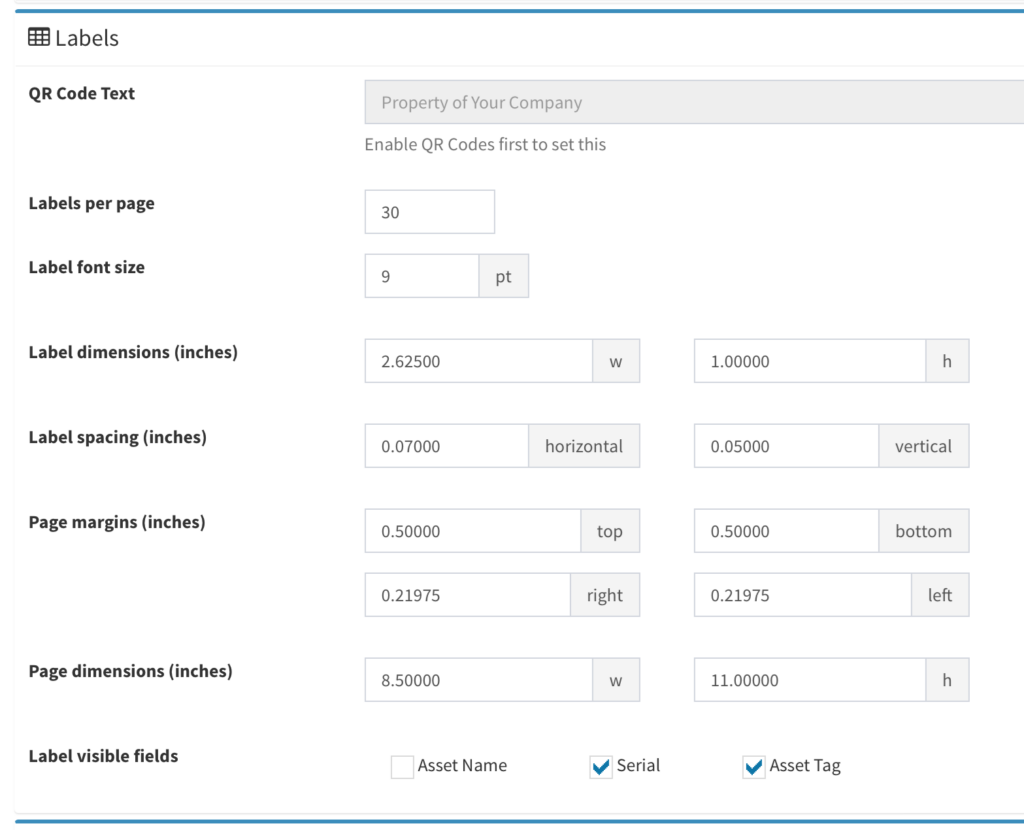
Source: Snipe-IT
Why Choose Snipe-IT Over Asset Panda
Snipe-IT appeals to a different buyer than Asset Panda:
Free with No Feature Gating.
Snipe-IT’s self-hosted version is completely free under the AGPL-3.0 license, with zero restrictions on users, assets, or functionality. Every feature, including custom fields, barcode generation, license management, API access, and LDAP/SAML integration, is available from day one.
Asset Panda’s entry point is $3,000/year (5 users at $50/user/month), and API access requires the Business+ plan ($7,200/year minimum).
A Purpose-Built Software License Management Module.
Snipe-IT includes a dedicated module for tracking software alongside hardware. Administrators create license records with product keys, purchase dates, expiration dates, and total seats. Individual seats can be checked out to specific users or assets, with real-time tracking of deployed vs. available seats and automated renewal alerts.
Asset Panda handles license tracking primarily through custom fields and configurations, though it also offers integrations like the Device Data Agent for importing software data.
Structured Accessories and Consumables as Distinct Item Types.
Snipe-IT explicitly separates inventory into Assets, Licenses, Accessories (returnable items like keyboards), and Consumables (depletable items like printer toner). Each category supports minimum-quantity alerts and checkout logging.

Source: Snipe-IT
Asset Panda handles these through its Kits + Consumables feature but uses a more flexible, configuration-driven approach rather than enforcing structural distinctions at the system level.
Full API Access on Every Plan, Including Free.
Snipe-IT’s REST API covers virtually every action in the web interface, available on the free self-hosted version with no paywall. Asset Panda gates API access behind the Business+ plan.
🏅 NOTE: We also evaluated SpiceWorks Inventory Online as a free alternative. While SpiceWorks offers free network scanning with ad-supported access, Snipe-IT provides a more complete, actively maintained open-source solution with a larger community, better documentation, and dedicated license management.
Snipe-IT Pricing
- Self-Hosted: Free. No limits on users or assets. Requires technical setup (LAMP stack, Docker, or IIS). Note that managed-hosting features like automatic backups and TLS certificates are not included in the self-hosted option.
- Basic Cloud: $39.99/month (or $399.99/year). Unlimited users and assets, TLS/SSL, automatic backups, and email support.
- Small Business Cloud: $99.99/month (or $999.99/year). Adds increased LDAP capacity and IP restrictions.
- Dedicated Cloud: Starts at $249.99/month. Private server, VPN connectivity, unlimited API calls, and optional enterprise support.

Who Should Use Snipe-IT?
Choose Snipe-IT if:
- You need a free asset management system and have in-house technical resources. If your team can manage a Linux server or Docker, you can run Snipe-IT at zero cost with no feature limitations.
- You need structured software license tracking alongside hardware management. The dedicated module provides seat allocation, expiration alerts, and compliance tracking out of the box.
- You want full API access without paying for a premium plan. Developers and IT teams get API access on every plan, including the free self-hosted version (cloud-hosted plans have rate limits).
- Your focus is IT hardware, software, and peripherals rather than multi-class asset management across vehicles, facilities, and equipment.
7. Reftab — Best Alternative for IT Asset Security and Device Lifecycle Automation
Reftab is a cloud-based IT asset management platform that zeroes in on the IT device lifecycle specifically, offering native integrations with device management platforms, identity providers, and HR systems that automatically keep asset records current.
Its key capabilities include:
- Software categorization and CVE vulnerability scanning that detects installed software and flags versions with known security vulnerabilities
- Advanced native MDM integrations with Microsoft Intune, Jamf Pro, Jamf School, and Kandji for auto-syncing device inventories
- Identity provider integrations with Okta and Entra ID via SCIM provisioning, plus Google Workspace and JumpCloud integrations for device and user management
- Self-service booking portal with white-labeling, RBAC-controlled browsing, approval routing, and calendar sync
- Unlimited user pricing on paid plans including a free-forever tier for up to 50 assets
Why Choose Reftab Over Asset Panda
Reftab automates what Asset Panda requires you to configure manually:
Automated Security Intelligence Through CVE Scanning.
Asset Panda does not appear to offer a built-in mechanism to assess whether the software on tracked devices poses security risks.
Reftab’s Business tier includes software categorization that identifies installed applications and cross-references versions against the CVE database. IT administrators can identify when a device runs software with known vulnerabilities, turning the asset platform into an active security monitoring layer.
Native MDM and Identity Provider Integrations That Eliminate Manual Entry.
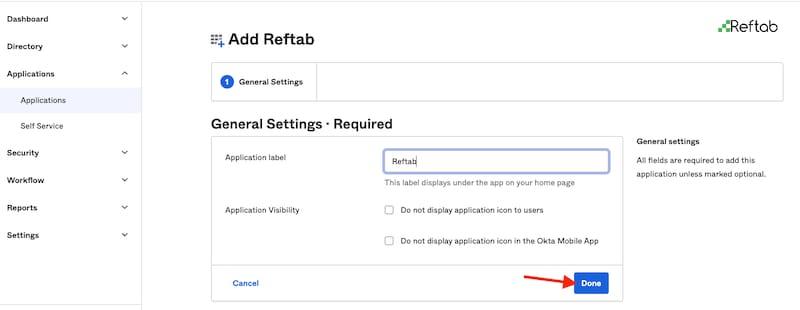
When Reftab connects to Intune or Jamf, it auto-syncs hardware specifications, installed software, and user assignments, then continuously updates records as changes occur.
Paired with SCIM provisioning through Okta or Entra ID, deactivating a user in the identity provider automatically flags them as disabled in Reftab, with automated reports to identify disabled users who still hold assets, facilitating offboarding workflows. Asset Panda supports similar integrations, but Reftab’s tighter coupling with the IT stack means less configuration overhead.
Source: Reftab
Transparent, Asset-Based Pricing with a Free Tier.
Reftab’s pricing is based on asset count, not users, with paid plans including unlimited users. The free-forever plan covers 50 assets. Accessories and software licenses do not count toward the billable asset quota, making it straightforward to compare costs. Asset Panda’s minimum is $3,000/year for five users.
🏅 NOTE: We also evaluated Itemit and Asset Infinity for this archetype. While Itemit excels at simplicity and Asset Infinity offers broad tracking, Reftab provides the most compelling combination of vulnerability scanning, advanced MDM integrations, and automated IT device lifecycle management.
Reftab Pricing
Paid plans include unlimited users:
- Free Forever: Up to 50 assets. Unlimited locations, categories, custom fields. Mobile apps, reports, reservations, and barcode scanning.
- Starter: Starting around $31.25/month (billed annually, for 250 assets; check Reftab’s pricing page for current rates). Adds SSO, license tracking, kit bundles, barcode designer, 2FA, and API access.
- Pro: Starting around $62.50/month (billed annually, for 250 assets). Adds changelog history, audits, software surveys, automated workflows, consumables, and RBAC.
- Business: Starting around $125/month (billed annually, for 250 assets). Adds all integrations (MDM, helpdesk, IdP), maintenance/work orders, CVE scanning, depreciation, and onboarding/offboarding tickets.
- Enterprise (3,000+ assets): Custom pricing and contracts.

Who Should Use Reftab?
Choose Reftab if:
- Your primary challenge is IT hardware and software lifecycle tracking and you need integrations with the MDM and identity platforms you already use.
- You need security monitoring as part of your asset management. Reftab’s CVE scanning provides software vulnerability visibility without a separate security tool.
- You want to start free and scale gradually. The free-forever plan with 50 assets provides an evaluation environment, not a time-limited trial.
- Your onboarding and offboarding processes are a recurring pain point. Reftab’s SCIM and HR integrations automate equipment assignment and collection when employees join or leave.
The Final Verdict
Asset Panda is a capable, highly configurable asset tracking platform. But as your needs become more specific, a purpose-built solution can deliver better functionality with less friction.
Based on our research, here are the best alternatives:
👉 Bulbthings for digitalizing asset-centric workflows with structured collaboration, Bulb AI, and advanced stock, fleet, or rental management
👉 EZOfficeInventory for affordable, integration-rich asset tracking for small teams on a budget
👉 IBM Maximo for enterprise-grade predictive maintenance and industrial IoT at massive scale
👉 UpKeep for mobile-first maintenance operations and CMMS with AI-powered work order intelligence
👉 Sortly for visual, photo-first simplicity with a generous free plan
👉 Snipe-IT for free, open-source IT asset management with full API access
👉Reftab for IT asset security and automated device lifecycle management
The right choice depends on your specific situation.
If you manage a diverse mix of physical assets across multiple locations or need your teams, suppliers, and customers collaborating on a single modern platform, Bulbthings was built for exactly that.
If your needs are narrower, whether it’s enterprise-scale predictive maintenance, IT-specific lifecycle management, or simply the most affordable tracking tool for a small team, there’s a specialized solution on this list for you.
Want to digitalize the way your team manages assets, with collaboration and AI built into every workflow? Start your free Bulbthings trial and see how a modern platform can transform your asset operations.