Sortly review 2026: Is this inventory management software right for you?

Sortly has built a loyal following among small businesses looking to replace spreadsheets with something visual, mobile, and fast. The platform lets teams photograph items, scan barcodes from their phones, and track inventory across multiple locations without IT support or formal training. For businesses whose biggest problem is knowing what they have and where it is, Sortly delivers a clean answer.
To write this Sortly review, we’ve analyzed it extensively. We believe it’s the ideal choice if:
- You need a simple, visual way to track physical inventory across locations
- Your team works in the field and needs a mobile-first experience with offline access
- You’re replacing spreadsheets and want to be operational within hours
- Your inventory needs are straightforward: quantities, locations, photos, and alerts
- You value ease of use over feature depth
However, Sortly might not be the best choice if:
- You need structured collaboration across internal teams, suppliers, and customers
- You manage multiple asset families (vehicles, equipment, consumables, buildings) in one operation
- You need stock management with intake, allocation, and value tracking
- You require maintenance scheduling, work orders, or CMMS capabilities
- You need rental and leasing workflows with customer invoicing
- You want AI-powered asset management with natural-language interaction
In this case, you should consider Bulbthings: a comprehensive asset inventory and management platform designed for mid-size businesses that need room to grow. Instead of forcing you into a rigid, complex setup from day one, Bulbthings operates as a highly flexible, modular solution. Built on a unified data model, it allows organizations across different sectors to start by perfecting their core inventory tracking, then seamlessly activate advanced features—such as CMMS, fleet logistics, rental workflows, or an AI copilot—exactly when their operations demand it.
We’ve included a detailed look at Bulbthings later in this Sortly review as the broader alternative for businesses that need more than inventory tracking. If you’re ready to explore a platform that covers the full asset lifecycle, you can get started with Bulbthings here.
What is Sortly?
Sortly is a cloud-based inventory management application founded in 2013 and headquartered in Redwood City, California. The company started as a personal organizing app called “My Things” before pivoting to serve small businesses. Today it positions itself as “Simple Inventory Management Software” built for teams that need to track physical items without enterprise overhead.
The platform centers on a mobile-first design: workers use their smartphones to photograph items, scan barcodes and QR codes, and update inventory from job sites, warehouses, or vehicles. Items are organized in a folder hierarchy that mirrors physical locations, with tags, custom fields, and up to 8 photos per item providing a visual record of every asset.
Sortly reports serving 15,000+ businesses across construction, medical, warehouse, electrical, education, retail, and government sectors, with approximately 70 employees distributed across three countries. The platform has processed 47 million transactions and stores 11.5 million items. Enterprise customers include VMware, Thermo Fisher, T-Mobile, and Carvana, though the core audience remains small businesses with 5 to 200 employees.
Sortly Pros & Cons
| Pros | Cons |
|---|---|
| ✅ Easy to set up and use | ❌ Performance slows with large inventories |
| ✅ Mobile-first with full offline access | ❌ Item count caps create pricing pressure as you grow |
| ✅ Visual inventory with photos on every item | ❌ No maintenance, fleet, or field service management |
| ✅ Built-in barcode and QR code scanning via smartphone | ❌ Limited integration ecosystem |
| ✅ Low stock and date-based alerts on all paid plans | ❌ API and webhooks restricted to Enterprise plan |
| ✅ Affordable entry point at $24/month (annual) | ❌ No RFID support |
| ✅ 14-day free trial plus permanent free tier | ❌ Reporting lacks depth for analysis |
Sortly Review: How It Works & Key Features
Mobile App & Offline Access: Sortly puts inventory management in every worker’s pocket, with or without an internet connection.
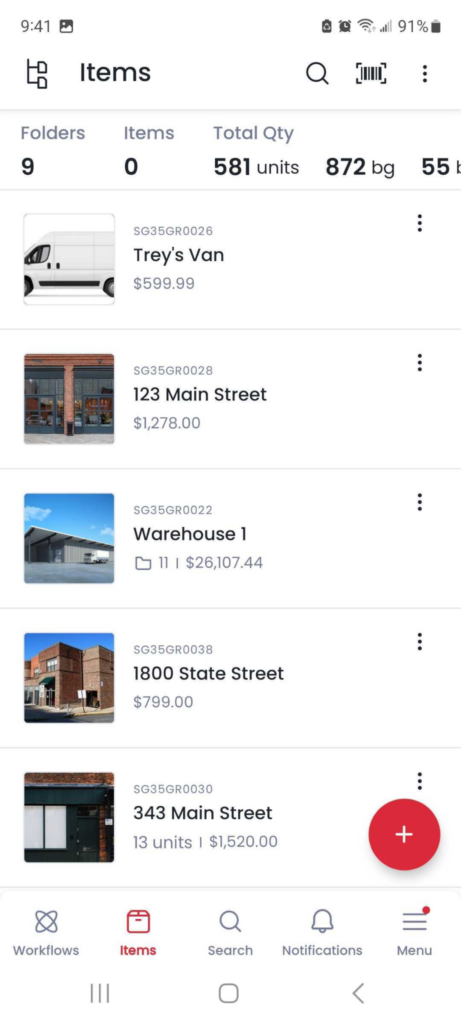
Sortly’s native iOS and Android app is the heart of the platform. Workers scan barcodes, update quantities, move items between locations, and capture photos from their phones. The app isn’t a stripped-down companion to a desktop system; it carries the full feature set.
Source: Sortly
The standout capability is Offline Mobile Access. When workers are in basements, rural job sites, or warehouses with dead zones, the app keeps working from locally stored data. Changes made offline stay on the device and sync when connectivity returns. This matters for construction crews, field technicians, and warehouse staff who can’t wait for a signal to do their jobs.
Quick Actions let users pre-configure what happens when they scan a barcode: adjust quantities, move items, add tags, clone, or edit, all without extra navigation. For high-volume scan sessions, this cuts the tap-by-tap friction that slows inventory workflows. The app supports Bluetooth and USB third-party scanners on all plans for teams that prefer dedicated hardware.
Item Tracking & Organization: A visual, photo-first approach to knowing what you have and where it is.
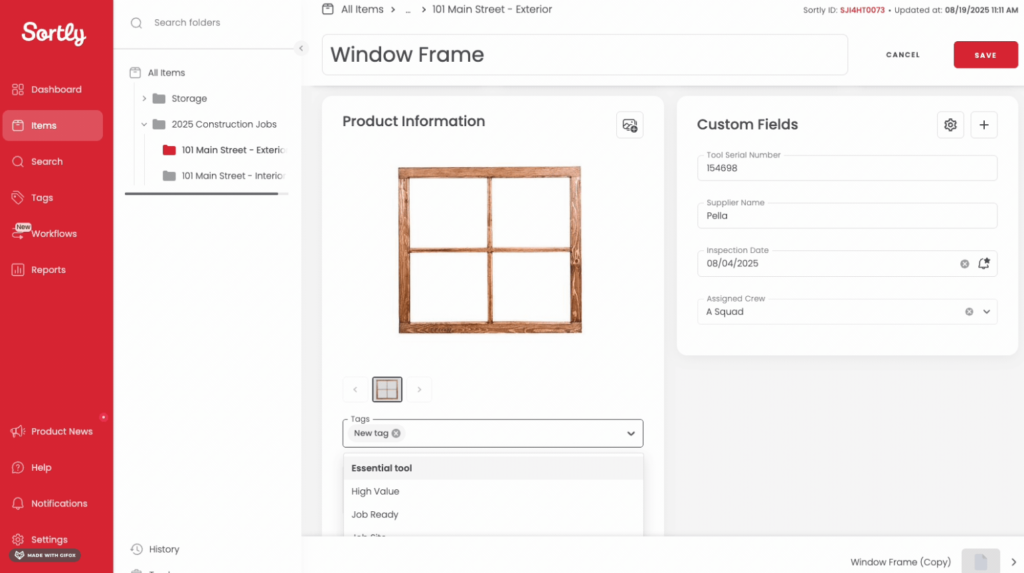
Sortly organizes inventory through two parallel systems. Custom folders and subfolders mirror physical locations (warehouses, trucks, storage rooms, job sites), while tags group items by attributes like brand, condition, or status regardless of location. This lets a worker find an item by location or by characteristic in the same search.
Source: Sortly
Photos are central to how Sortly works. Each item supports up to 8 photos on all paid plans, serving two purposes: identification (what does this item look like?) and condition tracking (what shape is it in after this job?).
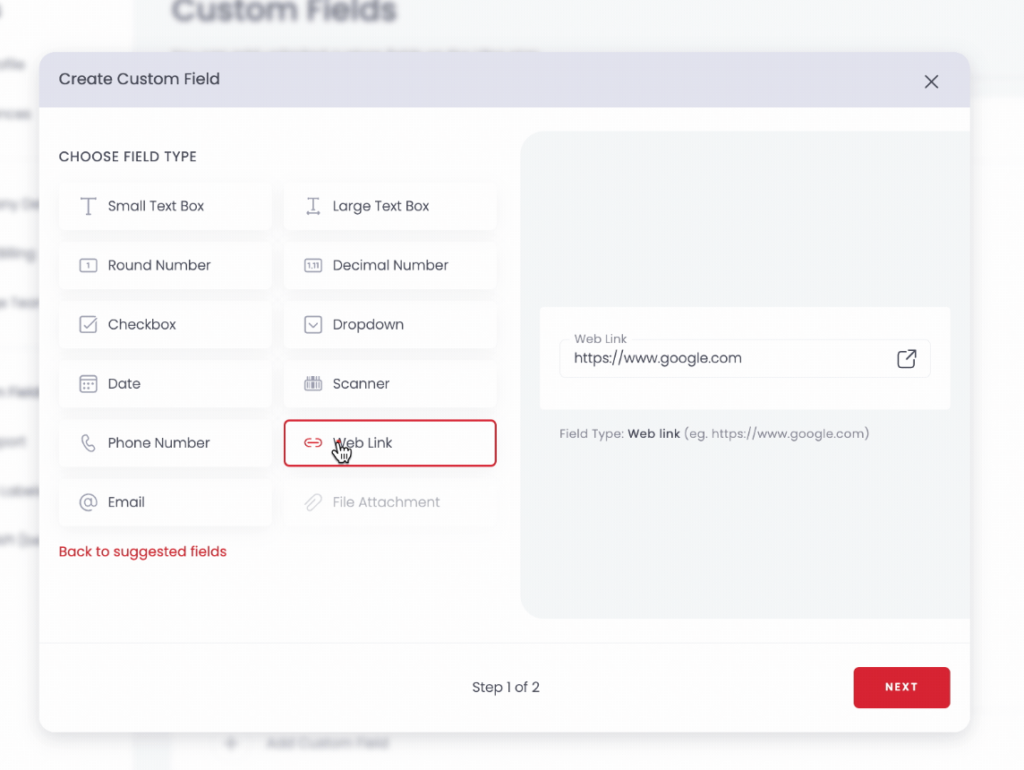
Custom fields extend item records beyond the defaults. Sortly offers 12 field types including text, numbers, dates, dropdowns, barcodes, weblinks, and file attachments (for warranty documents or manuals). The number of custom fields scales with your plan: 1 on Free, 5 on Advanced, 10 on Ultra, 20 on Premium, and unlimited on Enterprise.
Source: Sortly
Check-in and check-out works through Sortly’s Move workflow: items move from one folder to another (say, from “Available Inventory” to a person’s name or a job-site folder), with every move logged in Activity History. A Return to Origin feature sends items back to their starting folder in one step.
Barcoding & QR Code Scanning: Turn any smartphone into a scanner and create labels without third-party tools.
Sortly’s barcode and QR code system handles the full label lifecycle inside the app. For items with existing manufacturer barcodes, users scan the code and link it to a Sortly item record. The app queries Amazon and eBay databases to auto-populate item details, saving manual data entry.
For items without labels, users can generate and print QR code or barcode labels from Sortly. Labels can include item name, price, tags, custom fields, company logo, and photos, then export as a PDF for printing. Multiple label sizes are supported, from 1″x1″ micro labels to 8.5″x5.5″ extra-large formats. Bulk printing lets teams select items by folder or search and generate all labels in one pass.
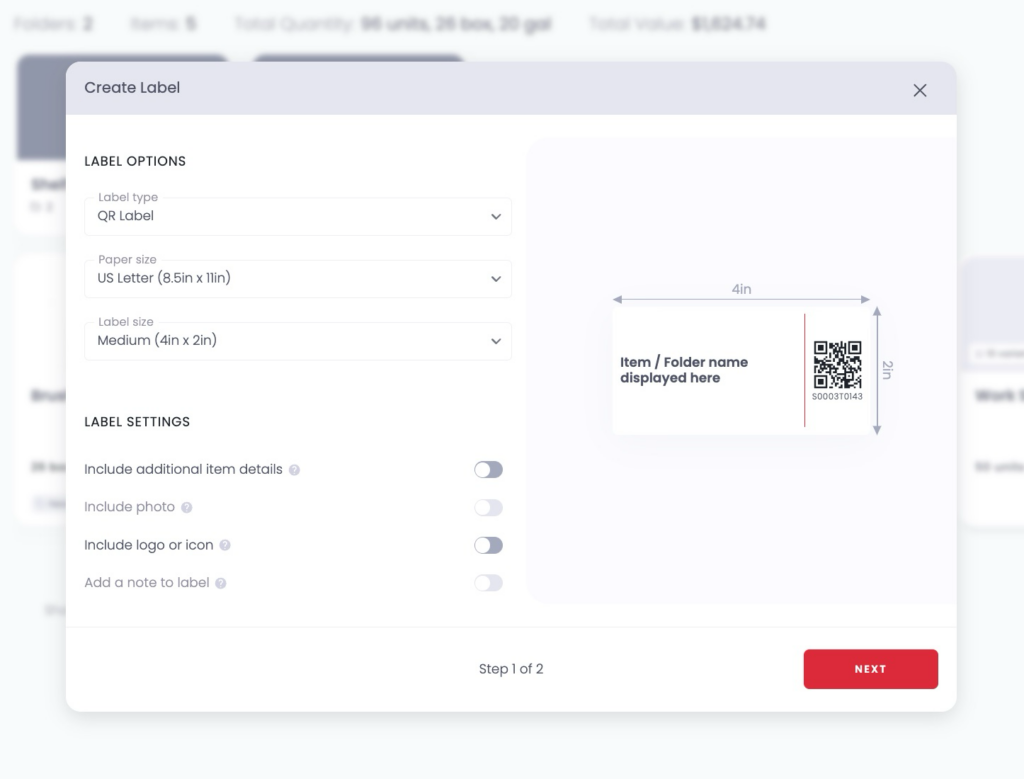
Source: Sortly
One notable limitation: RFID label creation is not supported. Businesses in warehousing, manufacturing, or healthcare that rely on RFID for bulk, line-of-sight-free scanning will need to look elsewhere. Barcode label creation is also limited to Ultra, Premium, and Enterprise plans; Advanced plan users can only create QR code labels.
Alerts & Reporting: Stock monitoring and audit-ready inventory records.
Sortly’s alert system covers two scenarios. Low stock alerts trigger when item quantities drop to a set minimum, notifying selected team members via email and in-app notifications. Date-based alerts fire before warranty expirations, maintenance deadlines, or certification due dates. Both types are available on all paid plans and can be configured in bulk across multiple items.
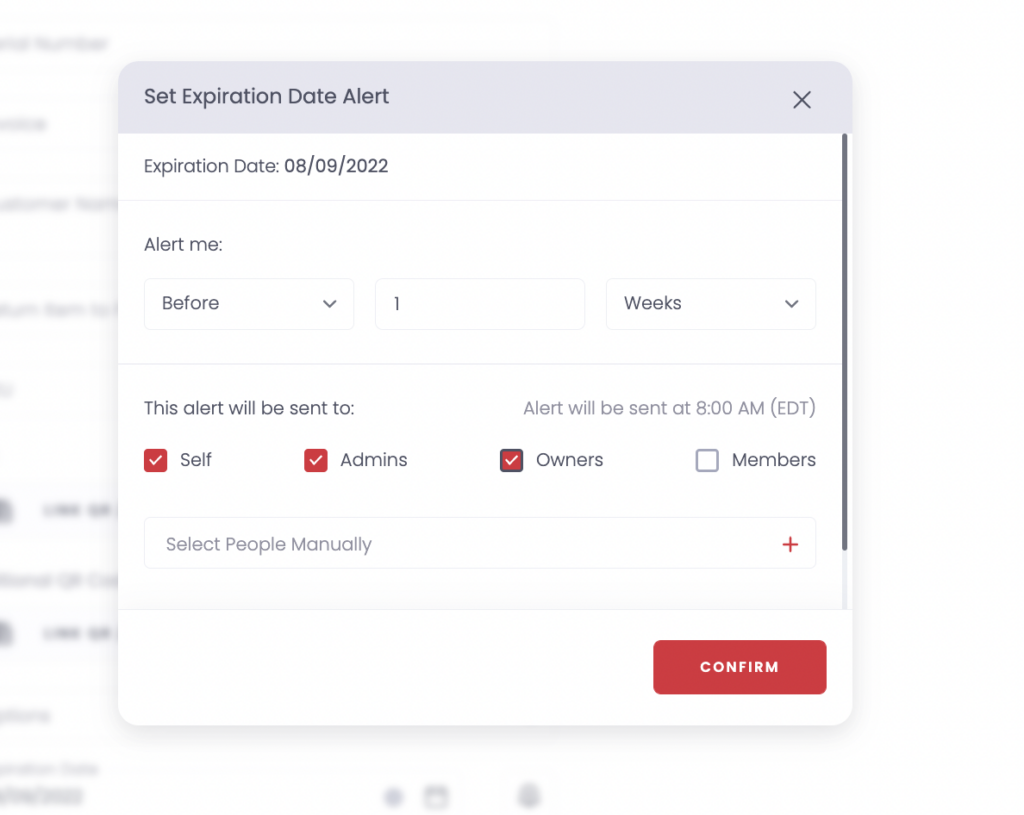
Source: Sortly
Reporting includes six standard report types: Activity History, Inventory Summary, Transaction Report, Item Flow, Move Summary, and Low Stock Report. All reports export to CSV or XLSX. Saved Reports (Ultra and above) let users bookmark filtered views for repeated access, and Report Subscriptions (Premium and Enterprise) automate delivery on a daily, weekly, or monthly schedule. The Inventory Snapshot feature creates an end-of-month inventory record, retaining up to 13 months of history for audit purposes.
History retention scales by plan: Free gets 1 month of Activity History, Advanced gets 1 year, Ultra gets 3 years, and Premium/Enterprise get unlimited.
Pricing Structure: Tiered by item count and user seats, with annual discounts.
Sortly offers five tiers:
Free — $0/month
- 100 items, 1 user
- 1 custom field, 1-month activity history
- No label creation, no integrations, no API
Advanced — $49/month | $24/month billed annually
- 500 items, 2 users
- 5 custom fields, QR code label creation, 1-year history
Ultra — $149/month | $74/month billed annually
- 2,000 items, 5 users
- 10 custom fields, QR and barcode labels, purchase orders, 3-year history
Premium — $299/month | $149/month billed annually
- 5,000 items, 8 users
- 20 custom fields, QuickBooks Online integration, unlimited history
Enterprise — Custom pricing
- 10,000+ items, 12+ users
- Unlimited custom fields, API and webhooks, SSO, dedicated account manager
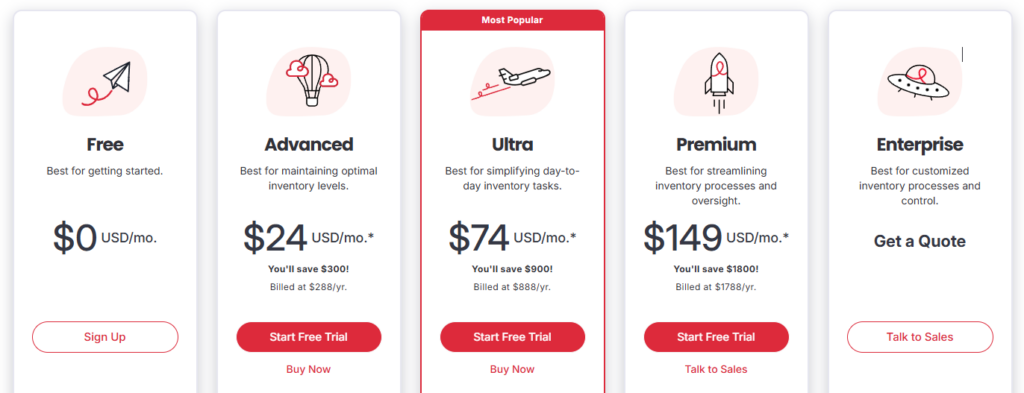
All paid plans include a 14-day free trial. The permanent free tier covers basic needs for very small teams. Annual billing saves roughly 50% over monthly pricing. Note that subscriptions are non-refundable and auto-renew unless canceled before the billing period ends.
Where Sortly Falls Short
Sortly excels at inventory visibility for small teams, but several limitations surface as operations grow. These constraints reflect a platform scoped for inventory tracking, not full asset operations.
Inventory Only, Not Asset Operations. Sortly tracks what you have and where it is. It does not schedule maintenance, generate work orders, manage fleet vehicles, dispatch field technicians, or handle PPE compliance. Businesses whose physical assets require ongoing maintenance, safety inspections, or operational workflows will need separate systems, creating data silos between inventory records and asset operations.
Performance Under Scale. G2 reviewers note the software “can be slow at times, particularly when handling larger inventories,” and Capterra users report the mobile app “can lag a bit when handling a large inventory.” For businesses approaching thousands of items, the experience may degrade.
Item Count Ceilings Drive Costs Up. The tier structure means growing businesses frequently hit plan limits. Capterra reviewers report steep price increases, with one citing costs jumping from $1,500/year to $5,360/year over two years. There are no custom plans; you move to the next tier or live with the cap.
Narrow Integration Ecosystem. Native integrations are limited to Amazon Business, QuickBooks Online, Slack, Microsoft Teams, webhooks, and an API. There are no connectors for Xero, Shopify, SAP, or other ERP systems. Webhooks and API access are restricted to the Enterprise plan, putting programmatic integrations out of reach for most customers. Capterra reviewers report being promised integrations that “never materialized.”
Reporting Stays Surface-Level. Reports cover the essentials (activity logs, stock summaries, transaction history), but Capterra reviewers flag limits on data analysis and no way to connect to BI platforms. There are no real-time dashboards, no chart widgets, and no cost-of-ownership or depreciation analytics.
No RFID, No IoT. RFID is not supported, and there are no IoT sensor integrations for condition monitoring, GPS tracking, or telematics. Businesses that need automated data collection from connected devices will find no path forward within Sortly.
These aren’t design flaws. They’re the natural boundaries of a tool built to do inventory tracking well and nothing else. But for businesses managing assets that need maintenance, compliance, fleet oversight, or field service coordination alongside inventory, Sortly’s scope leaves a gap that a broader platform can fill.
Top Sortly Alternative for Full Asset Management: Bulbthings
Bulbthings addresses Sortly’s operational gaps as an Enterprise Asset Management (EAM) platform built for mid-sized companies that have outgrown basic inventory tools but don’t need the overhead of enterprise ERP systems. Founded in 2014 in London, the platform covers the full asset lifecycle, from procurement and onboarding through daily operations, maintenance, and eventual disposal, unifying every workflow and stakeholder in a single collaborative workspace. Rather than requiring separate tools for inventory, maintenance, fleet management, and field services, Bulbthings brings them together, eliminating the data silos that fragment operations as businesses grow.
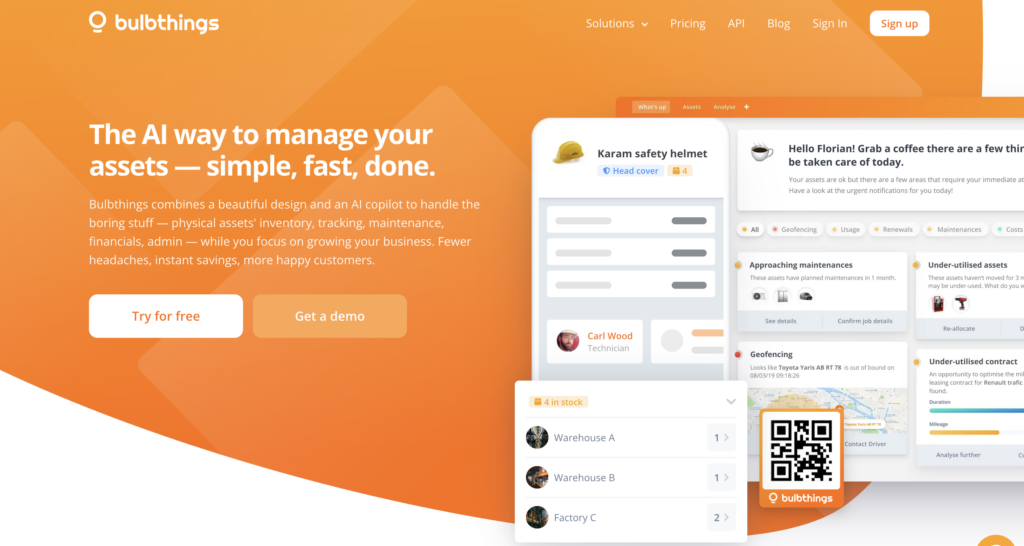
Where Sortly stops at knowing what you have and where it is, Bulbthings extends into what condition it’s in, when it needs service, who’s responsible for it, and what it’s costing you across its lifetime.
Asset Inventory & Multi-Class Tracking: One data model for every type of physical asset.
Bulbthings manages the full range of physical assets in a single workspace. Serialized equipment, bulk consumables, vehicles, buildings, IT assets, and production tools all live in the same workspace, with asset inventory, CMMS, fleet management, field services, PPE tracking, and rental/leasing available from one interface. Each asset class has different needs (vehicles require mileage tracking and heavy maintenance scheduling, computers mostly need corrective maintenance, consumables need quantity-based stock tracking) and the platform handles all of them.
The platform provides multiple inventory views: registers, stock levels, floor maps (indoor) and GPS maps (outdoor) for location tracking, and planning views.

Each asset profile keeps a complete history including allocations to locations or people, bookings, maintenance activities, service or financial contracts, and conversations.
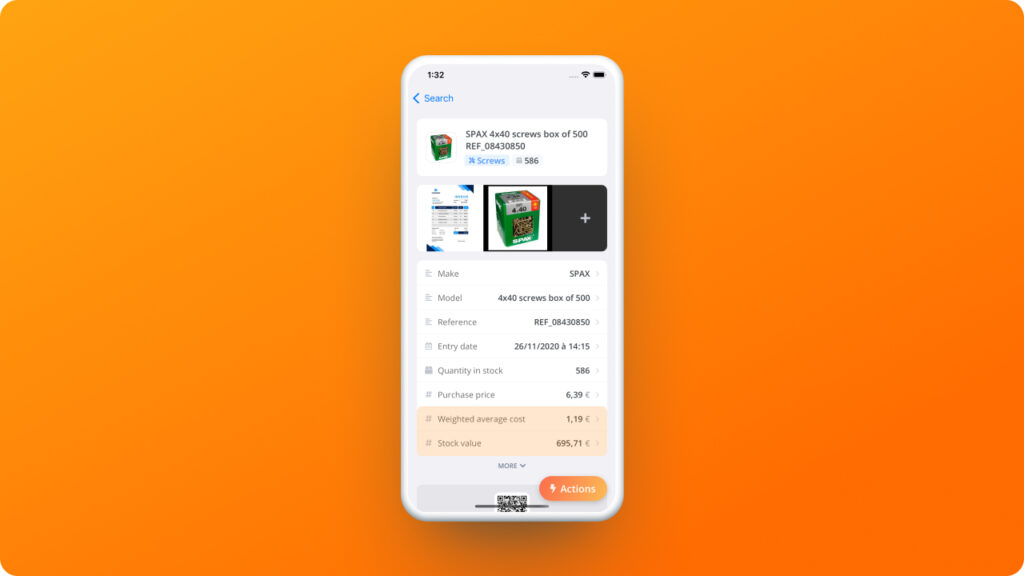
Assets can be added through multiple methods: using Bulb AI with image recognition via the mobile app, importing spreadsheets through an automated import module, scanning QR codes to tag and register assets, or manual entry. The platform also supports customization without developers through custom asset categories, sub-categories, and fields that let teams adapt it to non-standard use cases. Eden Rock (Oetker Collection) extended Bulbthings to manage supplier orders, villa breakfast preparation, and delivery tracking alongside fixed assets.
This multi-class approach eliminates the data silos that form when businesses run separate tools for each asset family. A maintenance work order links directly to the asset’s location, ownership, booking history, and cost record.
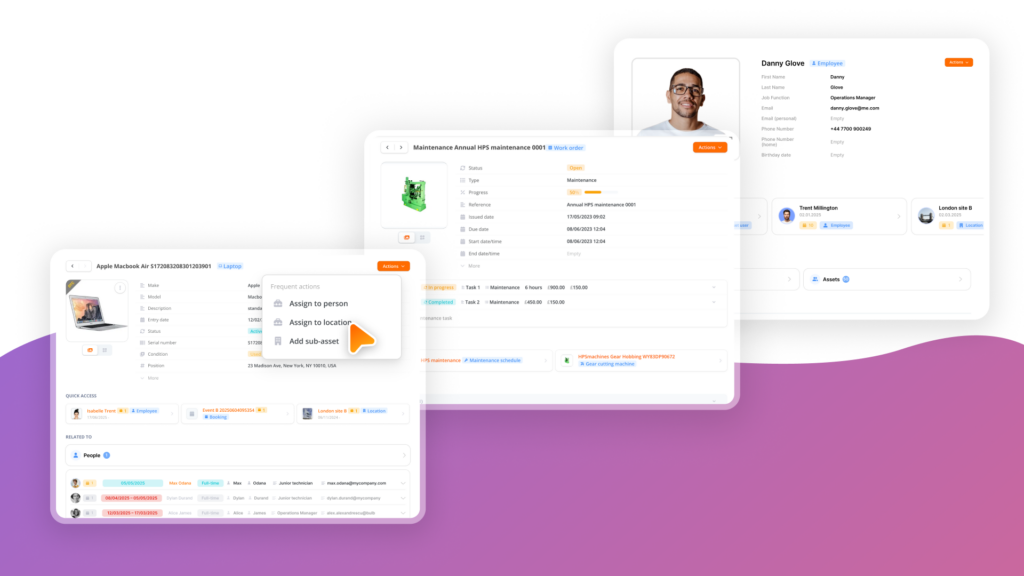
James Fisher Renewables moved from Excel because they needed parent-to-child asset hierarchies, warehouse-to-site movement tracking, equipment hire invoicing and financial reporting in one place, managing a portfolio worth over £15 million in subsea spares.
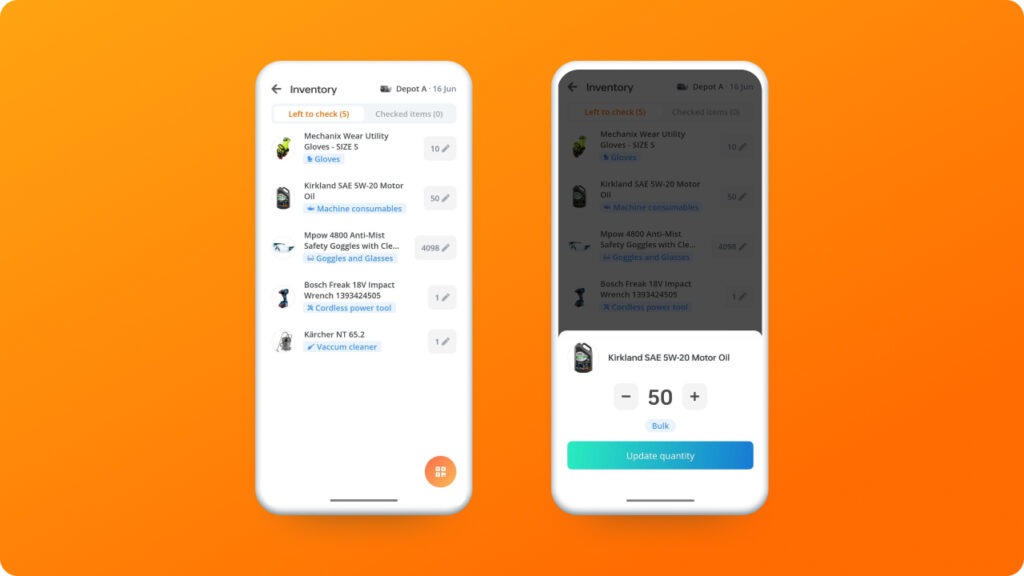
Modern, Intuitive Design: A clean interface that cuts training and onboarding time.
The Bulbthings platform is built around simplicity. The interface uses a consistent tab-based layout where, as the company describes, “getting things done with Bulbthings works the same for everything.” Despite covering a wide range of asset operations, the UI stays clean (a contrast to traditional asset management software that tends toward dense menus and steep learning curves).
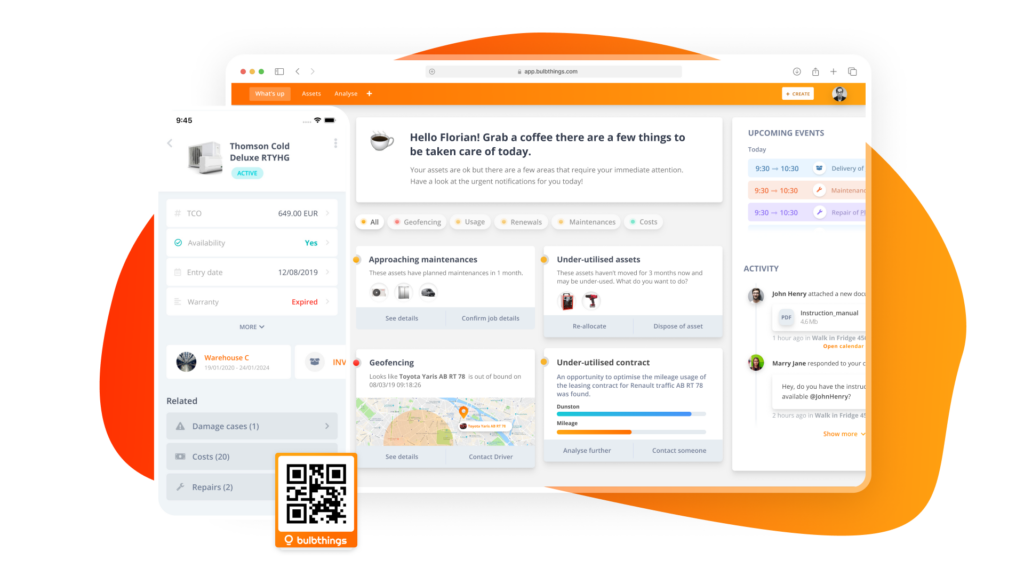
Capterra and GetApp reviewers rate both ease of use and customer support at 5.0/5. The Customer Success Team provides hands-on help with onboarding and workspace setup, with digital project management services available for larger implementations.
BBC Broadcast Engineer Ryan McCartney noted: “We tried 15 tools before yours guys… We are super impressed by how smart your design is!” (Bulbthings)
Team Collaboration: Structured collaboration across internal teams, suppliers, and customers.
Where Sortly is designed for individual workers updating inventory records, Bulbthings is built around multi-party collaboration (what the company calls “WhatsApp for assets”).
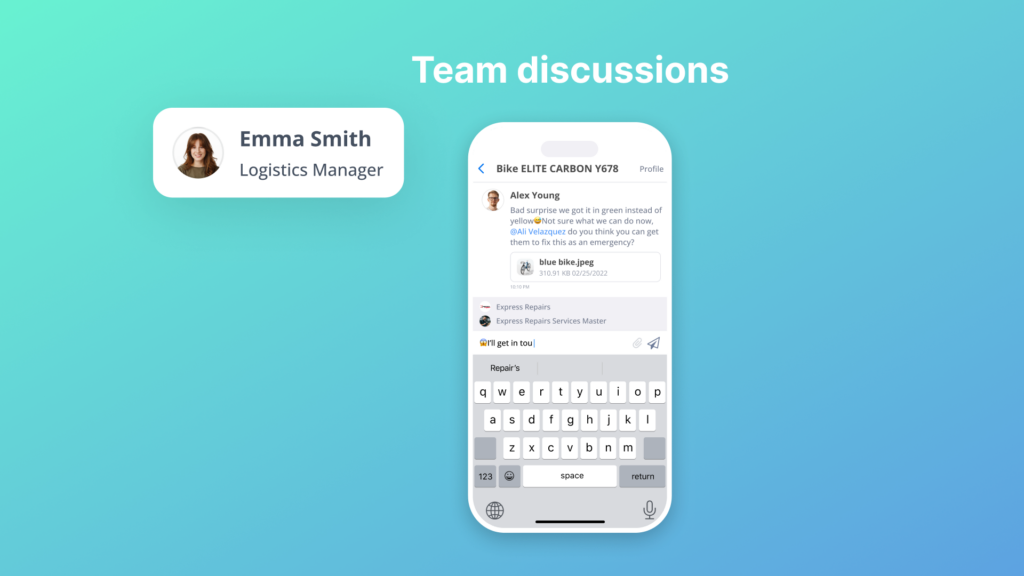
The platform offers workspace management for different teams, collaborative workflows spanning internal departments, suppliers, and customers, and cross-country collaboration with multi-language, currency, and metrics support.
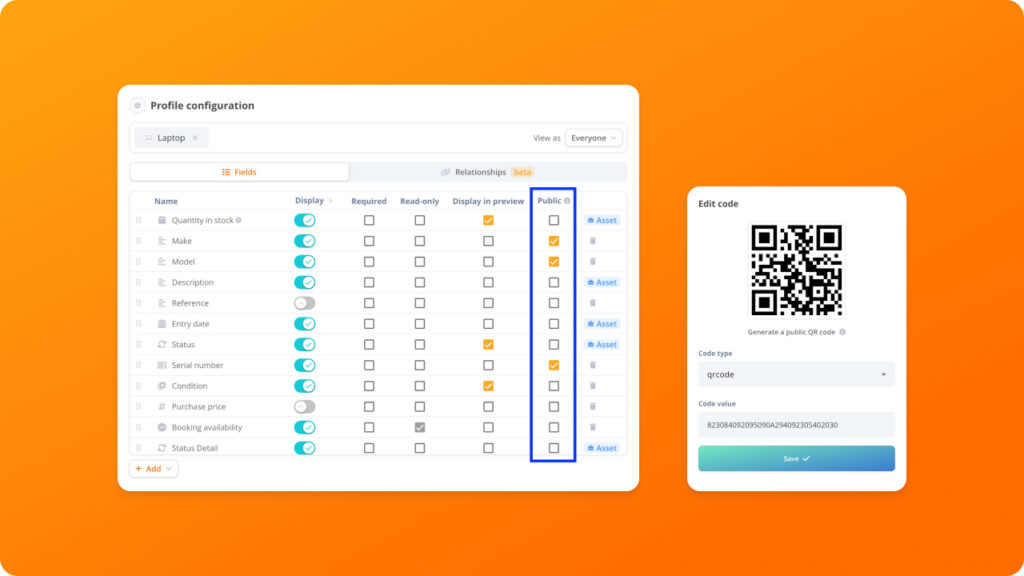
Granular roles and permissions can be configured based on nearly any criteria, so each user (whether an internal team member, a supplier, or a customer) sees only what they need and can only perform relevant actions. This level of permission control is typically found only in enterprise solutions.
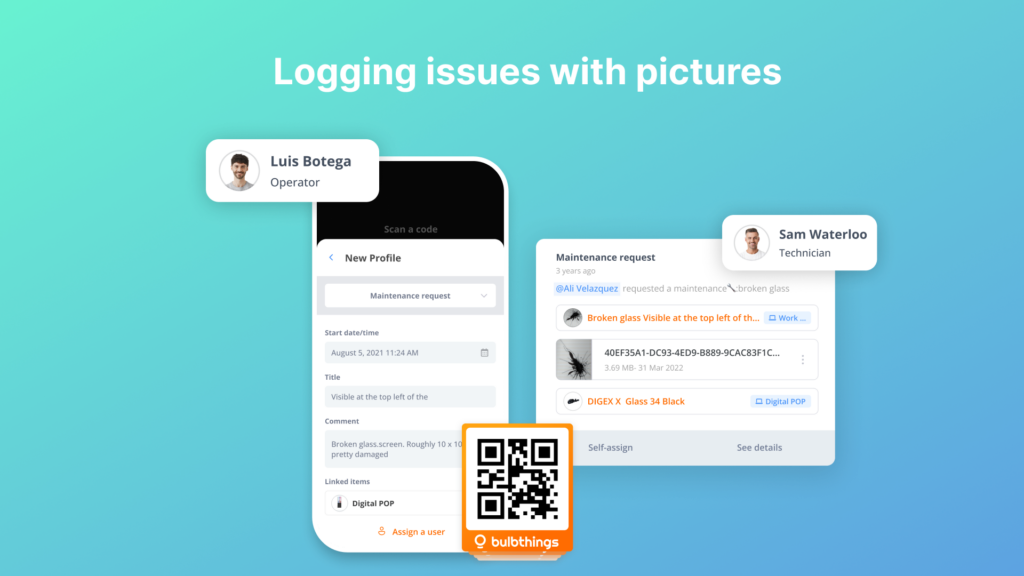
The platform also lets users share public information via link or QR code. Office users or building occupants can scan a public QR code to log issues without downloading the app or having a Bulbthings account. Work order information can be shared with suppliers via email links. This collaboration model is a key differentiator: Sortly’s folder-based structure works for tracking within a team, but it doesn’t support workflows that involve external partners.
AI-Powered Asset Management: Natural-language interaction with your entire asset base.
In January 2026, Bulbthings launched what it positioned as the first dedicated AI agent for asset management. Bulb AI is a copilot (not limited to a single function like predictive analytics) that lets users act on assets (create, book, assign, log maintenance, create maintenance schedules), pull reports and insights, and query the application, all through natural-language prompts (chat or voice).

The AI includes image recognition: users photograph an asset via the mobile app and ask Bulb AI to create it in the system. This offers three practical advantages: instant onboarding (no need to learn the interface), faster execution (especially for bulk actions on large asset volumes), and on-demand insights.
A Developer AI Agent is in development that will let customers customize workflows using natural language, further reducing the need for technical resources.
Advanced Stock Management: Stock tracking beyond basic item counts.
Sortly tracks item quantities and triggers low-stock alerts, but its stock management stops there. Bulbthings includes full stock capabilities: intake, allocation to locations and people (for PPE distribution, materials tracking, and consumable management), value calculation, alerts on minimum and maximum stock levels, and stock level trends and reporting.
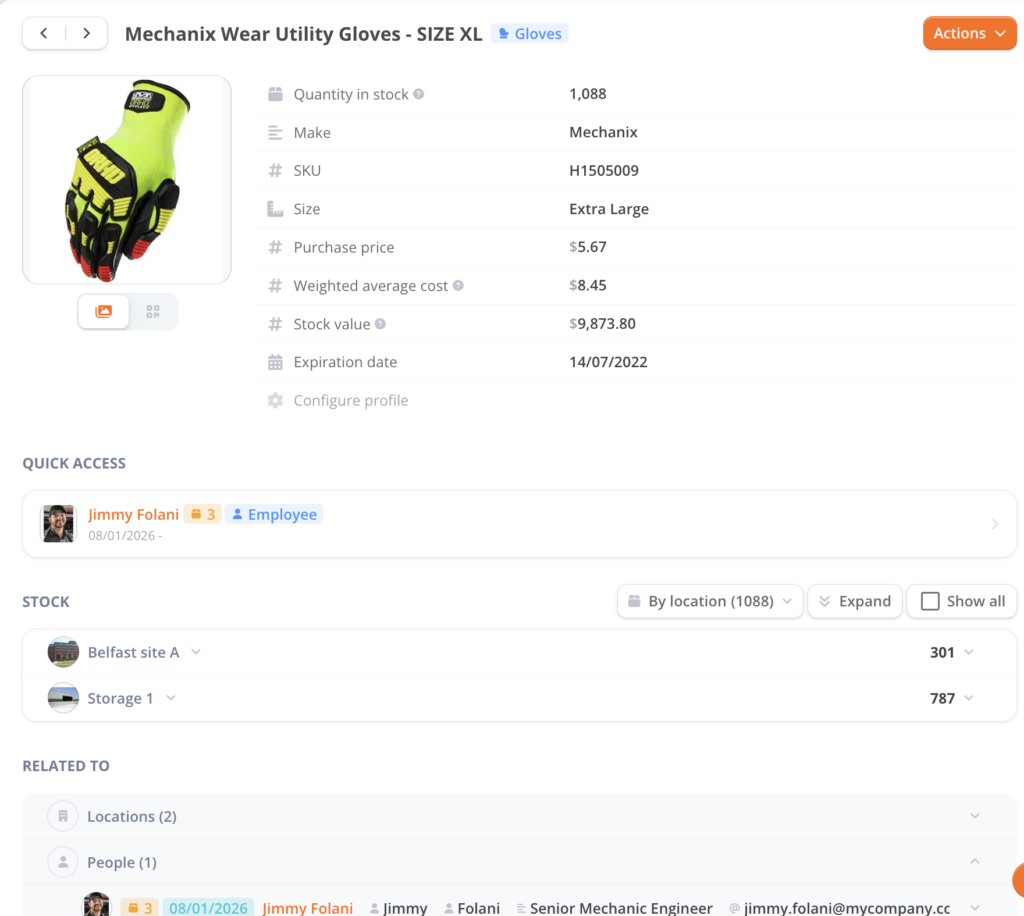
This matters for businesses whose inventory operations go beyond knowing what’s on the shelf. When stock needs to be allocated across multiple sites, tracked by value for financial reporting, or monitored for consumption trends over time, Bulbthings handles these workflows natively rather than requiring export-and-analyze workarounds.
Asset Tracking & Traceability: Complete visibility into where every asset is, who has it, and how it got there.
Since Sortly’s core strength is inventory tracking, it’s worth examining how Bulbthings approaches the same challenge at a deeper level of detail.
The platform provides comprehensive traceability through logical tracking that records every assignment of an asset to a person, location, project, or cost centre, building a complete audit trail over time. Every movement and status change is captured, giving teams full historical visibility into an asset’s journey through the organization.
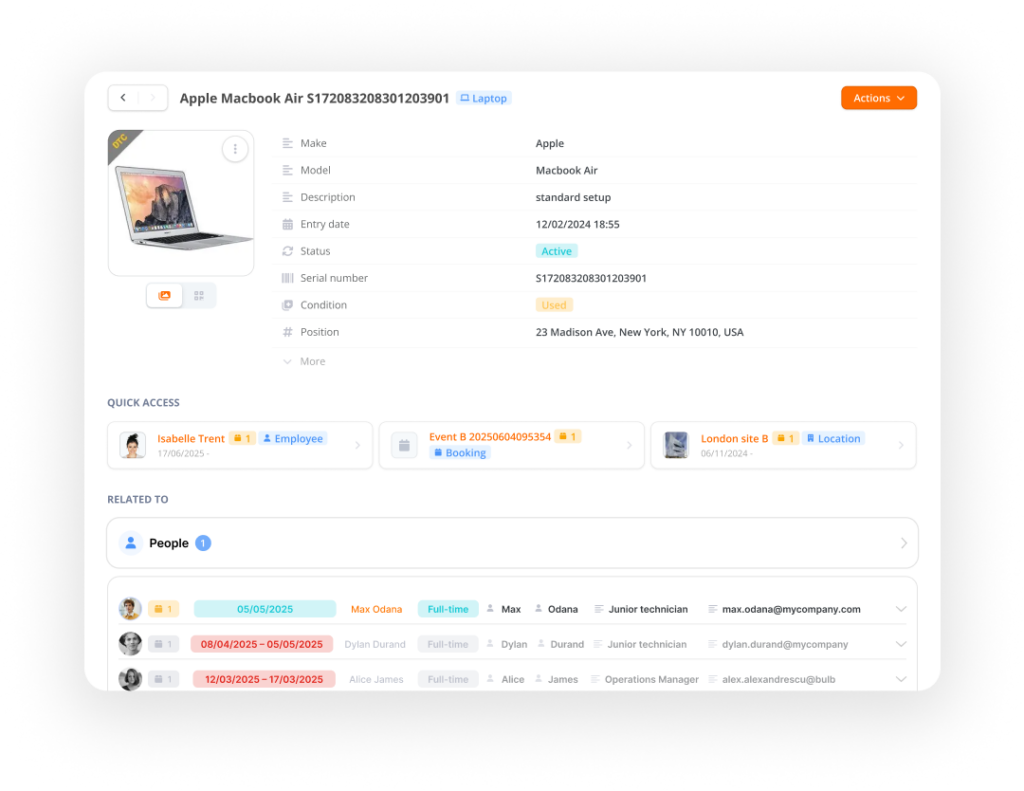
Bulbthings also supports unlimited locations or parent-child asset hierarchies, enabling teams to manage complex relationships such as a shipping container holding multiple boxes, each containing serialized equipment and consumables. This kits-and-bundles approach lets organizations track assets at whatever level of granularity their operations require.
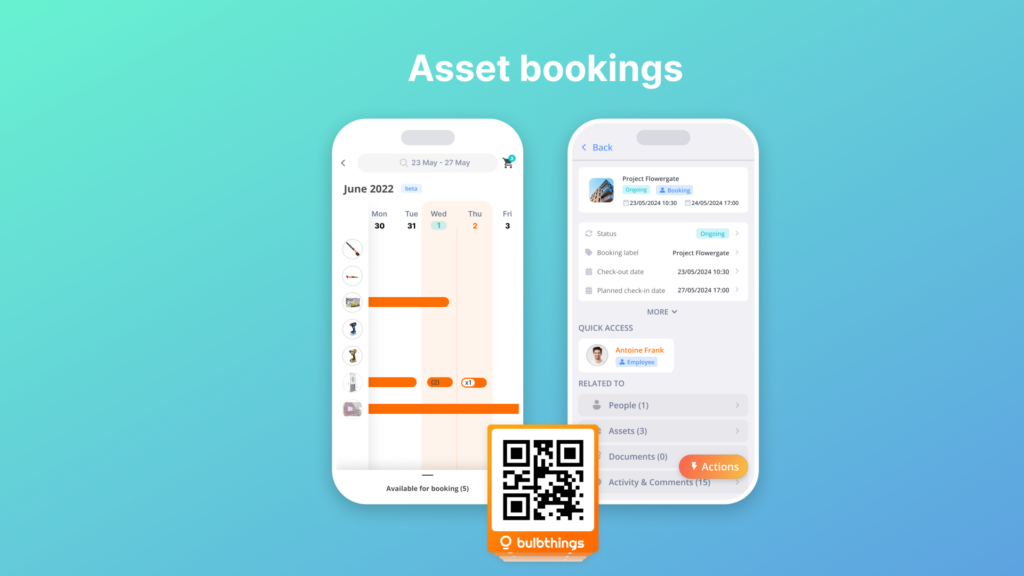
For check-in and check-out workflows, Bulbthings goes well beyond Sortly’s folder-based Move system. Teams can configure multiple workflow options: store-manager-controlled distribution or team self-service, with configurable approval steps and lender’s acceptance requiring document upload or electronic signature. Advance bookings let teams reserve assets ahead of time, preventing scheduling conflicts across locations.
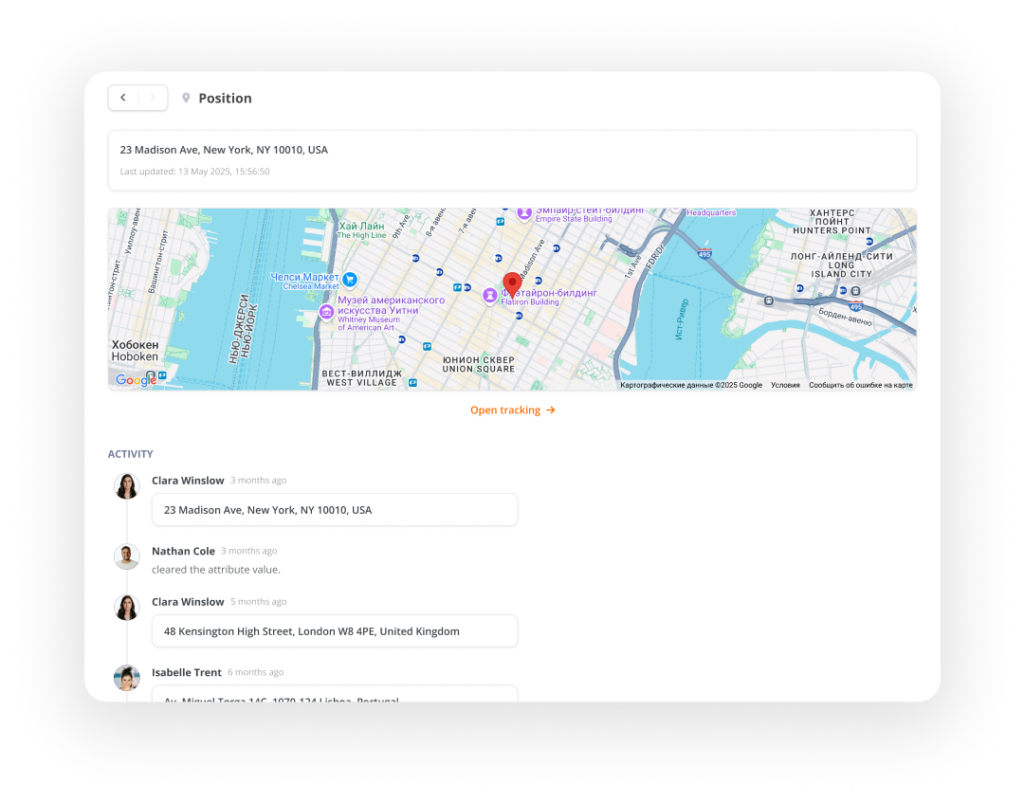
Physical tracking rounds out the picture. Mobile assets appear on Google Maps for outdoor location monitoring, while indoor assets such as furniture and facilities equipment are displayed on uploaded floor plans. Combined with the logical tracking layer, this gives operations teams both the “where is it physically” and the “who is responsible for it” answers in one view.
Sortly’s folder hierarchy handles basic location tracking effectively, and its full offline mobile access remains a notable advantage for field teams working in areas with poor connectivity. But for organizations that need auditable traceability, hierarchical asset structures, and governed check-out workflows, Bulbthings provides a more structured foundation.
Vehicles and Plant Fleet Management: Mileage tracking, fuel management, and driver oversight.
For businesses managing vehicles alongside equipment, Bulbthings provides fleet operations covering mileage tracking, fuel consumption tracking, driver incident reporting, fines and damages management, and end-of-life management. For corporate fleets, the platform handles leasing contract quotation and comparison, ordering from suppliers, fleet cost import (maintenance, fuel, financing or depreciation), and Total Cost of Ownership calculation.
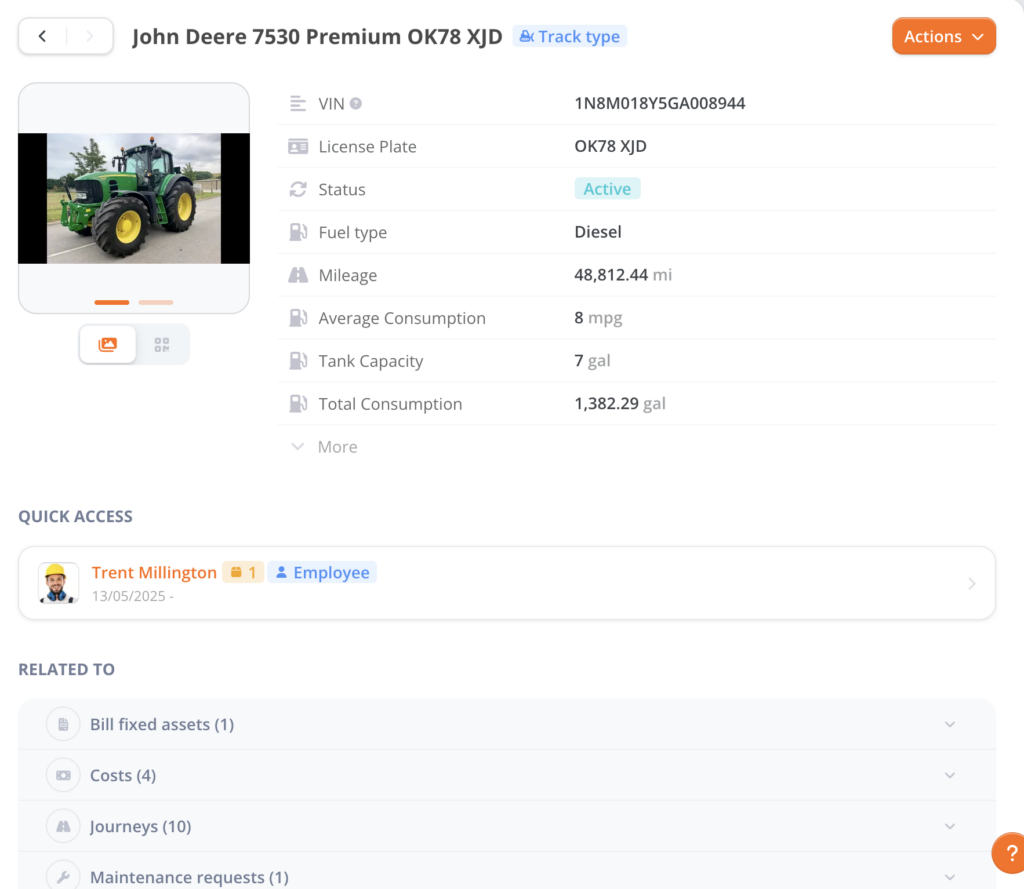
Driver management includes calendar-based vehicle assignment, self-service booking via the driver app, driving scores, and automated licence and MOT compliance checks. The platform surfaces financing, maintenance, fuel, damage, and leasing costs together in dynamic reports, helping fleet managers spot hidden spending. Idling and geofencing alerts notify managers when vehicles operate outside defined parameters.
The Field Services module connects office operations with distributed technicians. Managers plan recurring maintenance schedules, assign work orders, and monitor job status. Customers can scan equipment QR codes to submit service requests and receive live status updates without installing any software. Automated cost computation feeds into customer invoicing.
Service Providers and Rental/Leasing Management: Front-office, logistics, and back-office operations in one workflow.
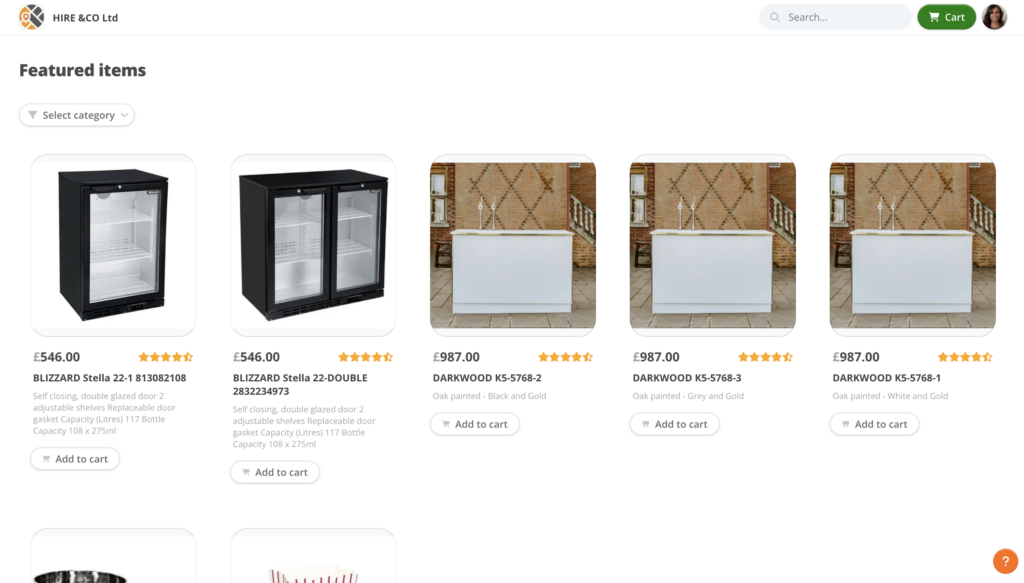
Bulbthings covers three operational areas for rental and leasing businesses. Front-office: customer records, CRM integration, e-shop plug-in, quotation and invoicing. Logistics: supplier records, orders, delivery management, and end-of-rental checks. Back-office: inventory and stock management, maintenance management, and financial reporting.
Front office shop (web site plugin):
Stock item, back office view:
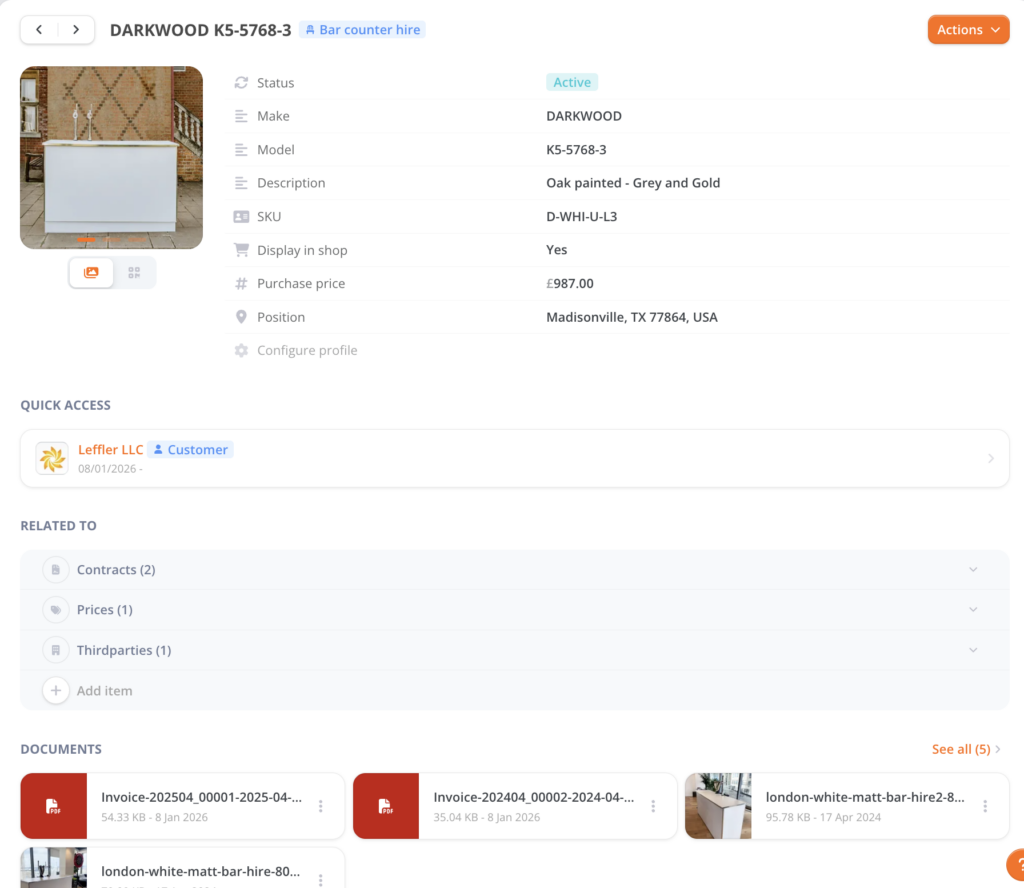
Sortly doesn’t touch this space. Businesses that rent or lease equipment (whether construction machinery, event production gear, or IT assets) can manage the full rental lifecycle from the same platform where they track asset condition, maintenance history, and availability.
CMMS & Maintenance Management: Preventive and corrective maintenance built into every asset record.
Sortly tracks items but can’t schedule a service event or assign a repair task therefore it cannot enable the tracking of work orders’ parts and consumables.
Bulbthings includes a full CMMS module that handles both corrective and preventive maintenance from the same interface where assets are tracked.
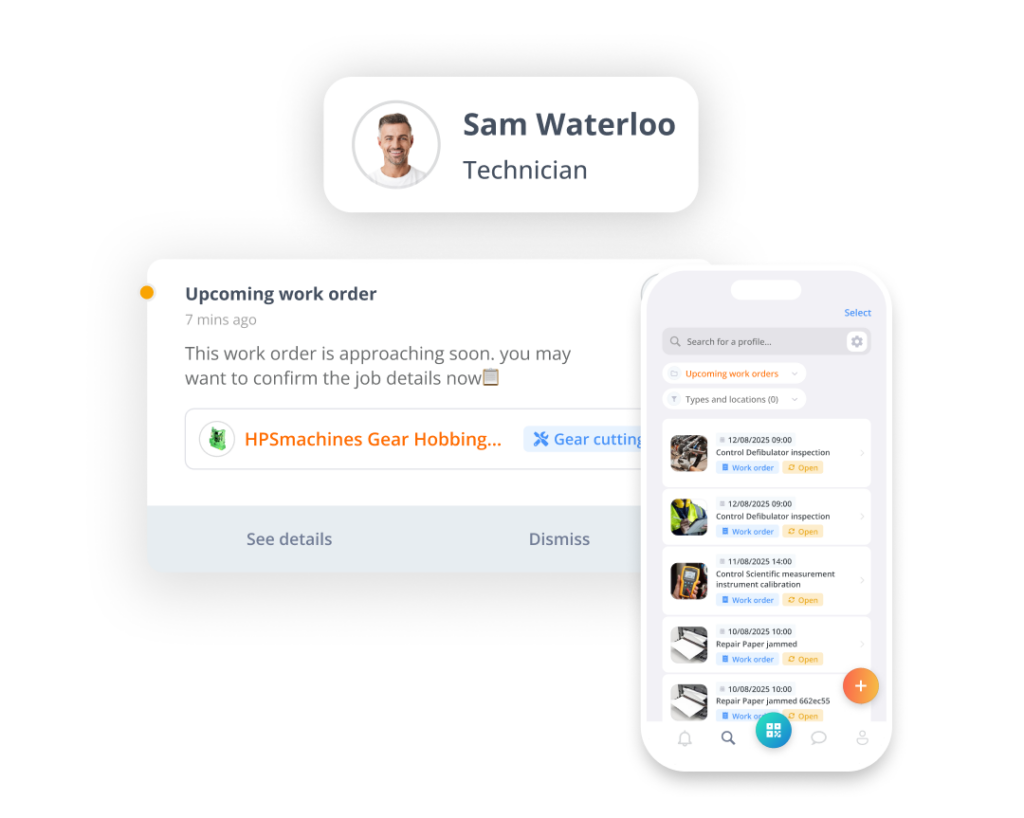
Anyone can start corrective maintenance: a machine operator or building occupant scans the QR code on an asset and submits a request with comments and photos, without needing a Bulbthings account. The request automatically creates a work order for the responsible technician.
Preventive maintenance schedules support three trigger types: time-based (every 30 days), meter-based (every 500 hours or miles), and condition-based. When a threshold is reached, the system generates the next work order. Technicians access their queue through the mobile app, scanning QR codes to pull up work orders, log time, and add notes from the field.
The financial layer tracks parts, consumables, labor time, and supplier charges against each work order, computing Total Cost of Ownership. Budget alerts notify managers when spending hits defined thresholds. Maintenance is one of Bulbthings’ strongest capabilities, but it represents just one layer of an EAM platform that extends across the full asset lifecycle.
Telematics and IoT Connectivity: Optional sensor integration for automated data collection.
As an optional add-on, Bulbthings connects with GPS tracking devices and IoT sensors (RFID, Bluetooth beacons, LoRa) for automated asset monitoring.
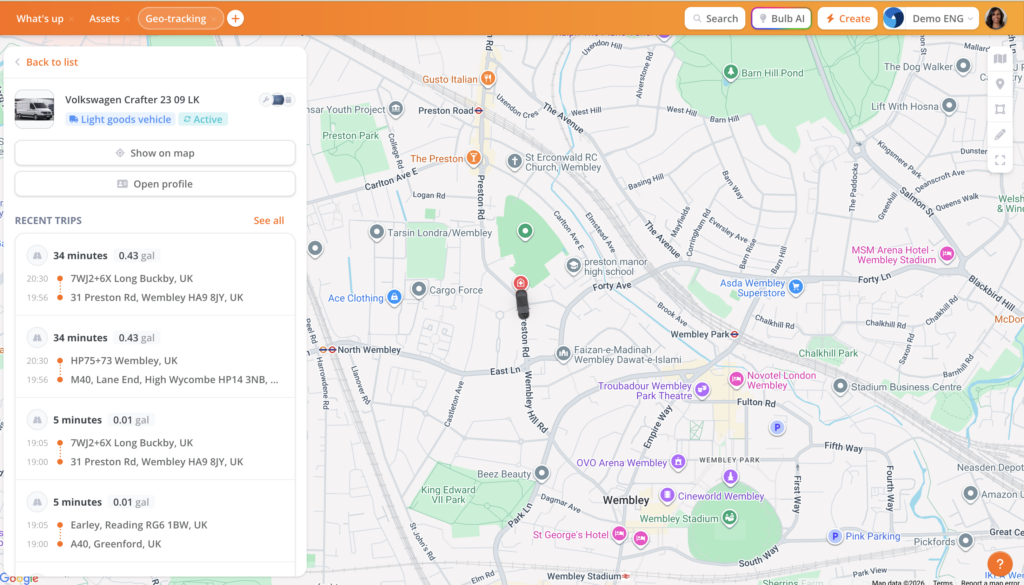
This extends into condition-based maintenance triggers: when a sensor reading crosses a threshold, the system can generate a work order. Businesses that need this capability can layer it on; those that don’t can ignore it without losing any core functionality.
Low-Code Workflow Automation: Customizable processes without developer resources.
Bulbthings was built as a low-code platform from the ground up, heading toward no-code capabilities. This lets teams customize workflows, validation processes, checklists, and forms without developer resources. The platform ships with off-the-shelf workflows by industry, so customers get pre-built solutions alongside customization options. A Workflow Builder feature is in development that will let customers configure workflows on their own.
Studiomatic* found that legacy ERP alternatives felt “outdated, with unattractive interfaces and too many unnecessary features,” while Bulbthings was “the only SaaS that combined modernity and the correct amount of comprehensiveness.” (Studiomatic Case Study)*
Pricing: Activity-based model with unlimited users included.
Bulbthings uses an activity-based pricing model rather than per-seat licensing. Monthly fees are calculated by industry, number of assets managed, and feature packs selected, with unlimited users at every level. Internal teams, suppliers, customers, and field workers can all collaborate without incremental licence costs, a direct advantage for businesses that need cross-party visibility into their assets.
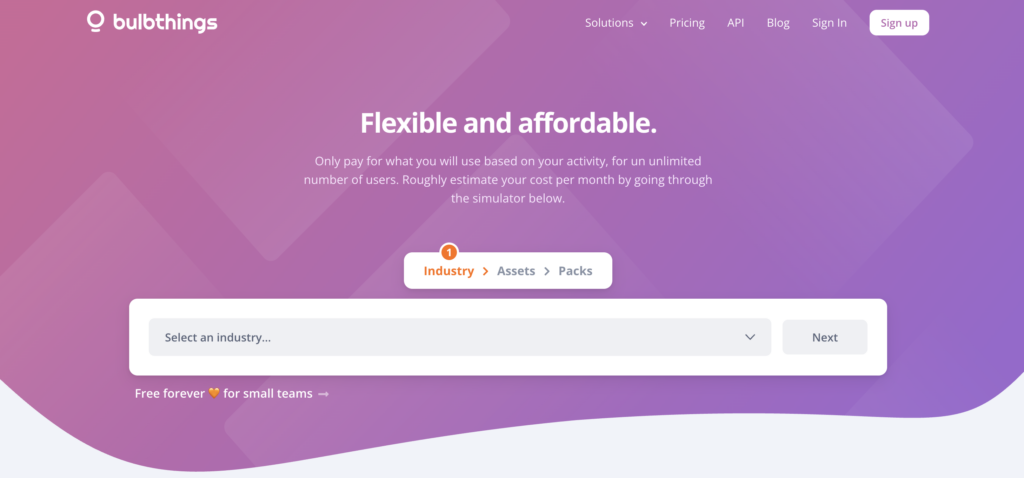
A free tier supporting up to 100 assets is available for small teams to test the workflow before committing. Paid plans offer discounts for annual (15% off) and semi-annual (10% off) billing. Self-onboarding with online payment is available, and specific pricing can be configured using the interactive pricing simulator on the Bulbthings website or by contacting sales.
Additional services include QR code label supply (from $250 per 1,000 units), onsite inventory services ($400/day), and custom-quoted integrations and IoT connectivity.
Sortly or Bulbthings: Comparison Summary
| Sortly | Bulbthings | |
|---|---|---|
| Primary focus | Inventory tracking for SMBs | All-in-one inventory and asset manangement for mid-size businesses |
| Target audience | Small businesses replacing spreadsheets | Mid-sized companies with multi-class asset operations |
| Team collaboration | Folder sharing within a team | ✅ Cross-team, supplier, and customer collaboration with granular permissions |
| Modern design & ease of use | ✅ 4.6/5 Capterra | ✅ 5.0/5 Capterra, reduced training requirements, especially with AI copilot |
| AI capabilities | ❌ None | ✅ AI copilot with natural-language actions and image recognition |
| Inventory & stock management | Basic item tracking with low-stock alerts | ✅ Stock intake, allocation, min-max stock alerts, value calculation, and trend reporting |
| Photos and documents | Up to 8 photos per item on paid plans | Unlimited photos and files on free plan and paid plans |
| Tracking mode | Bulk items (default) and serialized for high value assets | Serialized assets (default) and low value bulk items. |
| Tracking depth | Items are organized into folders, with up to 6 folders levels available. Folders can be used for kits, locations or people. | Items can be assigned to locations, people and parent/child assets. Assets hierarchy (e.g. item -> box -> container) and locations hierarchy (e.g. Warehouse -> Section -> Shelf) allow for unlimited levels. |
| Multi-location SKU stock tracking | ✅ Handles SKU distribution across multiple locations | ✅ Handles SKU distribution across multiple locations |
| Mobile app | ✅ Full offline access, 4.7 App Store rating | ✅ QR + NFC scanner, Bulb AI, field-team workflows |
| QR/barcode scanning | ✅ Built-in, all plans | ✅ Built-in, all plans |
| Last scanned position on map | ❌ None | ✅ Google map, Openstreet map. Optional geofencing. |
| Indoor position on floor map | ❌ None | ✅ Upload unlimited maps and position assets on maps. |
| Check-out, check-in and bookings | ✅ Simple folder move system | ✅ Asset bookings and check-out/check-in collaborative workflows |
| Asset condition and issues tracking | ✅ Asset condition info | ✅ Issue tracking collaborative workflows |
| Stock value calculation | Basic | Weighted average cost method. Other methods available on Enterprise plans. |
| PPE management | ✅ bulk or serialized equipment tracking, expiration date reminders. | ✅ bulk or serialized equipment tracking, expiration date reminders, inspection checklists, recurring controls or inspection scheduling |
| Work Order parts and consumables tracking | ❌ None | ✅ Work Order parts and consumables tracking for repairs and preventive maintenance. |
| Tracking of items onboard vehicles | ✅ Dual vizualization required: vehicle needs to be managed as a folder (location) and an asset. | ✅ Items can be assigned to vehicles directly. Vehicle loading/offloading checklists and workflows. Vehicles' position can be tracked in real-time on a map. |
| Rental/leasing stock management | ❌ None | ✅ Inventory and stock management alongside rental activity (i.e. customer quote, contracts, invoicing) |
| Telematics & IoT | ❌ Not available | Optional add-on: GPS, RFID, Bluetooth, LoRa, OBD |
| Low-code/no-code workflow automation | ❌ Not available | ✅ Customizable workflows, checklists, and validation processes |
| Pricing model | Per item count + user seats | Activity-based with unlimited users |
| Free tier | ✅ 100 items, 1 user | ✅ Up to 100 assets, unlimited users |
| Integrations | Limited (QuickBooks, Amazon, Slack, Teams) | REST API and SDK , webhooks, custom ERP/CRM connectors |
| Customer support | Help center, Enterprise CSM | AI copilot, Enterprise CSM |
| Best for | Simple, single-class inventory visibility | Multi-class asset lifecycle management with collaboration |
Final Verdict
The choice between Sortly and Bulbthings depends on whether your biggest challenge is inventory visibility or full asset operations.
Choose Sortly if:
- You need to track physical inventory across locations
- You want a simple, visual system without a steep learning curve
- Your team needs to know what you have, where it is, and when to reorder
- You rely on a mobile-first tool with offline access for field use
- Photo-based records improve how you organize and identify items
- Your assets are single-category (inventory or equipment only)
- You don’t need maintenance scheduling, fleet tracking, or partner workflows
Choose Bulbthings if:
- Your business has outgrown simple inventory tracking and needs full asset lifecycle management
- You manage multiple asset types (equipment, vehicles, stock, rentals)
- Your operations require collaboration between teams, suppliers, and customers
- You need preventive maintenance, fleet oversight, and stock allocation in one system
- You want to avoid data silos from using multiple disconnected tools
- You value AI assistance, low-code workflow automation, and unlimited-user pricing
- You’re a growing mid-sized company needing operational depth without enterprise complexity
Unify and scale your asset operations with Bulbthings.
Sortly solves the visibility problem: knowing what you own and where it sits. Bulbthings solves the operations problem: managing what you own across its entire lifecycle, with the collaboration, automation, and AI to keep every stakeholder connected. Your choice depends on which problem is bigger for your business today.
Sortly FAQ
Is there a free version of Sortly?
Yes, Sortly offers a permanent free plan covering 100 items and 1 user. It includes basic item tracking with folders, tags, and 1 custom field, but does not support alerts, label creation, integrations, or API access. All paid plans also include a 14-day free trial. Bulbthings similarly offers a free tier supporting up to 100 assets but includes unlimited users, so multiple team members (and even suppliers or customers) can evaluate the platform together.
How many items can you track on Sortly?
Item limits depend on your plan: 100 (Free), 500 (Advanced), 2,000 (Ultra), 5,000 (Premium), and 10,000+ (Enterprise with custom pricing). Moving between tiers is the only way to increase capacity since Sortly does not offer custom plans or individual feature purchases. Bulbthings’ activity-based pricing scales by asset volume without hard tier ceilings, and the pricing simulator lets businesses configure exact capacity needs.
Does Sortly support barcode and QR code scanning?
Yes, Sortly’s mobile app turns any smartphone camera into a barcode and QR code scanner on all plans. Users can also create and print QR code labels from the Advanced plan and barcode labels from the Ultra plan. Third-party Bluetooth and USB scanners are supported. However, RFID is not supported. Bulbthings also offers QR code and NFC scanning on its mobile app and supports RFID, Bluetooth beacons, and LoRa sensor integration as optional add-ons for automated data collection.
Does Sortly have maintenance or work order features?
No, Sortly is an inventory management tool only. It does not include maintenance scheduling, work order creation, preventive maintenance triggers, or technician assignment. Businesses needing these capabilities must use a separate CMMS alongside Sortly. Bulbthings integrates a full CMMS into its asset management platform, with corrective and preventive maintenance workflows, time-based and meter-based scheduling, and mobile work order management.
What integrations does Sortly offer?
Sortly natively integrates with Amazon Business US, QuickBooks Online, Slack, and Microsoft Teams. Webhooks and API access are available only on the Enterprise plan. There are no connectors for Xero, Shopify, SAP, or other ERP systems. Bulbthings provides a full REST API with webhook support and offers custom integrations with ERP, CRM, accounting, and HR systems, though these are quoted individually.
Can Sortly track assets across multiple locations?
Yes, Sortly supports multi-location tracking on all paid plans through its folder and subfolder hierarchy. Items are organized in custom folders that mirror physical locations, and the Move workflow logs every transfer. Lemoine’s disaster recovery team used this structure to manage over $1 million in equipment across 50+ active locations. Bulbthings similarly tracks assets across locations and adds floor maps (indoor), GPS maps (outdoor), geofencing alerts, and optional IoT-connected location data as an add-on.
Does Sortly work offline?
Yes, Sortly’s mobile app includes Offline Mobile Access on all plans. Users can view and update inventory without an internet connection, and changes sync when connectivity returns. This makes it practical for construction sites, rural locations, and warehouses with poor connectivity. Bulbthings also provides mobile apps for iOS and Android with QR-based field workflows, though its mobile app has limited offline capabilities.
Is Sortly secure enough for enterprise use?
Sortly’s Enterprise plan includes SOC 2 compliance, GDPR compliance, and SSO authentication. The platform runs on cloud infrastructure with 100% uptime reported across all components over the trailing 90 days on its status page. However, no ISO 27001, HIPAA, or FedRAMP certifications are publicly listed. Bulbthings is GDPR-compliant with a formal Data Processing Agreement incorporating EU Standard Contractual Clauses, though it also does not publicly advertise SOC 2 or ISO 27001 certifications.